Accounts payable software for small businesses
Know what you owe. Pay it on time.
Track supplier bills, purchase orders and vendor credits in one place. Record a partial payment and check which bills still need to be paid.
What do I still owe my supplier?
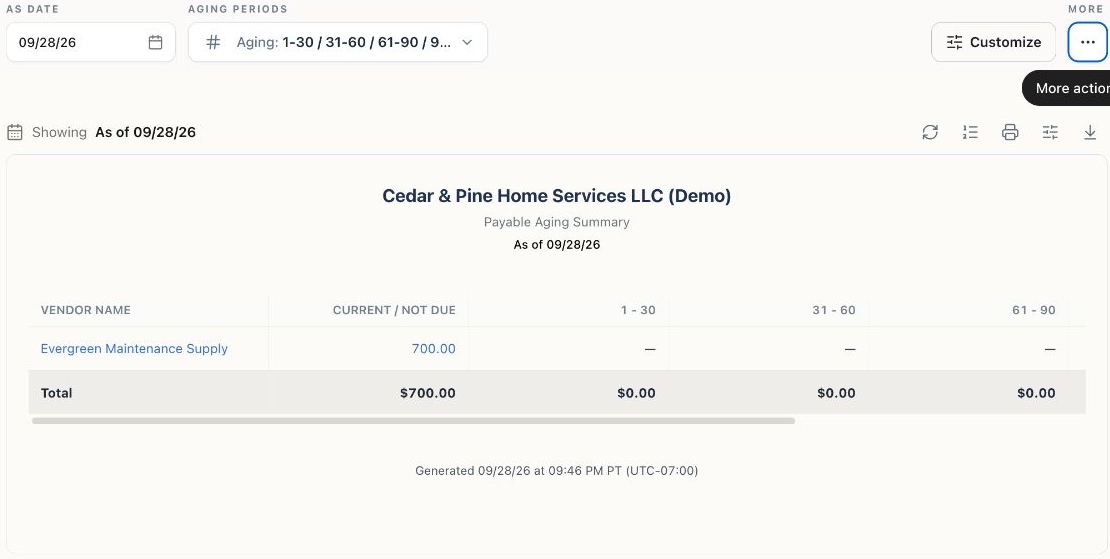
A supplier sends you a $1,000 bill due October 15. You apply a $300 payment on September 20. The open balance is $700. If there are no more payments or credits, here is how the same bill appears at two month ends.
| Report date | Still owed | Aging bucket |
|---|---|---|
| $700 | Current / Not Due | |
| $700 | 1–30 days overdue · 16 days late |
To check your own bills, open Reports → A/P Aging Summary and set As Date to the day you want to review. See how to run the report for one supplier.
Bills
Every bill, one list, zero surprises
Enter the supplier, amount and due date on each bill. Review what is due this week and record full or partial payments against the original bill.
- One list of everything you owe, sorted by due date
- Partial payments tracked to the penny
- Recurring bills remembered for you
- Vendor history one click away
Purchase Orders
Order it in writing, receive it in one click
Send a purchase order so both sides agree before money moves. When the goods arrive, convert it to a bill — quantities, prices, and stock all update together. And when a shipment lands short, receive what actually arrived: the open remainder stays on the order until it shows up or you close it.
- Professional POs your vendors can act on
- Convert to a bill when the order lands
- Received stock flows into inventory
- Open orders visible until they close
Vendor Credits
When a vendor owes you, don’t lose track
Short shipment, damaged goods, a pricing fix — record a vendor credit and apply it against the next bill. It sits in plain sight until it’s used, not in someone’s memory. Three months later, when that vendor’s next bill arrives, the credit is right there waiting — apply it and pay only the difference.
- Credits visible until fully applied
- Apply to any open bill from that vendor
- Returned stock adjusts inventory too
- The audit trail keeps the whole story
Expense Tracking
Where the money goes, without the shoebox
Card swipes and one-off costs get categorized as they happen — from the bank feed or in two taps. Come tax time, every deduction is already sorted. Because every month lands in the same plain-English categories, a creeping software bill gets caught in June — not discovered at year-end.
- Expenses categorized in plain language
- Pulls straight from your bank feed
- See spending by category any month
- Tax-time ready without the March panic
Stop paying late fees
Put every bill in one list and see what’s due before it’s due. Free to start.
Keep exploring
The rest of Bokeping
Invoicing & Sales
Professional invoices, estimates that convert, and payments that post themselves.
Learn moreBanking
Bring in bank activity, review its accounting treatment, and reconcile to a statement.
Learn moreInventory
Know what’s in stock, where it is, and what it really costs you.
Learn moreReports & Accounting
Real double-entry books, readable statements, and numbers that tie out.
Learn moreReady to know your money?
Free plan, no card needed. Bring your QuickBooks or spreadsheet history, invite your accountant, and start reading your own books today.