Bank feeds and reconciliation software
Your bank and your books, finally in sync.
Bokeping connects bank feeds, transaction review and statement reconciliation to the same double-entry books. Import a bank file on Free, or use automatic Plaid feeds on Standard and Pro. Match existing records, post reviewed entries, then check the statement balance.
View the workflowCheck the worked examplePlans and requirements
Bank Feeds
Connect a bank feed or import a statement file
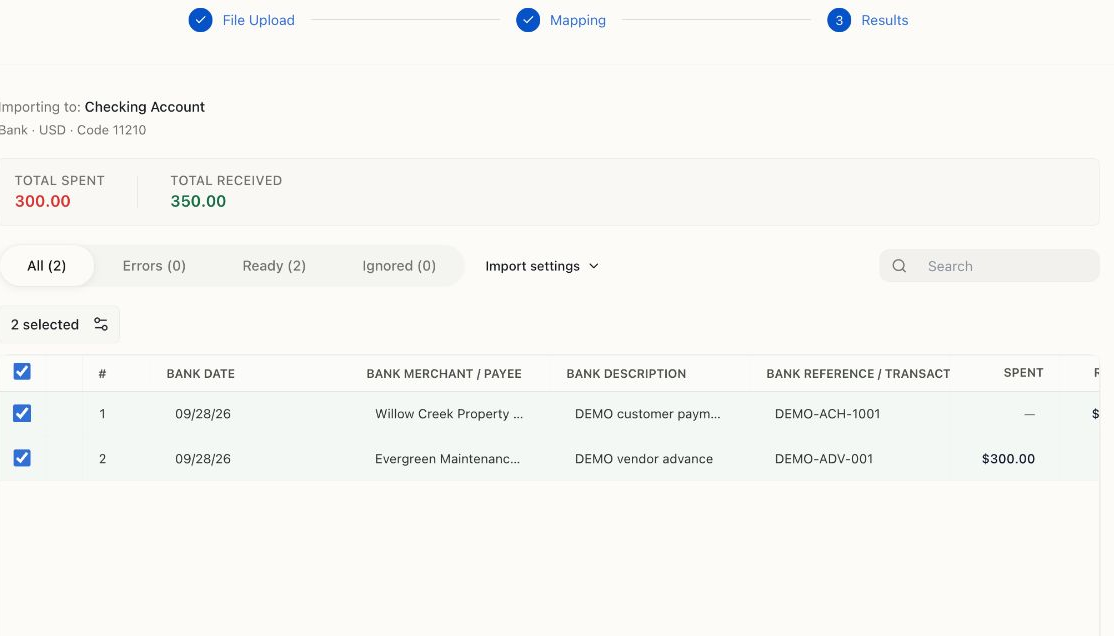
On Standard or Pro, choose Link account, authorize your institution through Plaid, and check which account in your books receives the activity. Availability and sync timing depend on the institution. File import is available on every plan: select the bank account, upload its statement file, map spreadsheet columns, and review the results before confirming.
- CSV, XLSX and XLS spreadsheets; OFX, QFX and QBO bank files
- Files up to 5 MB; review the target account and currency
- Check errors, duplicates and overlapping dates before importing
- A .qbo bank file is not a complete QuickBooks company backup
Match and categorize
Review the row before it becomes another entry
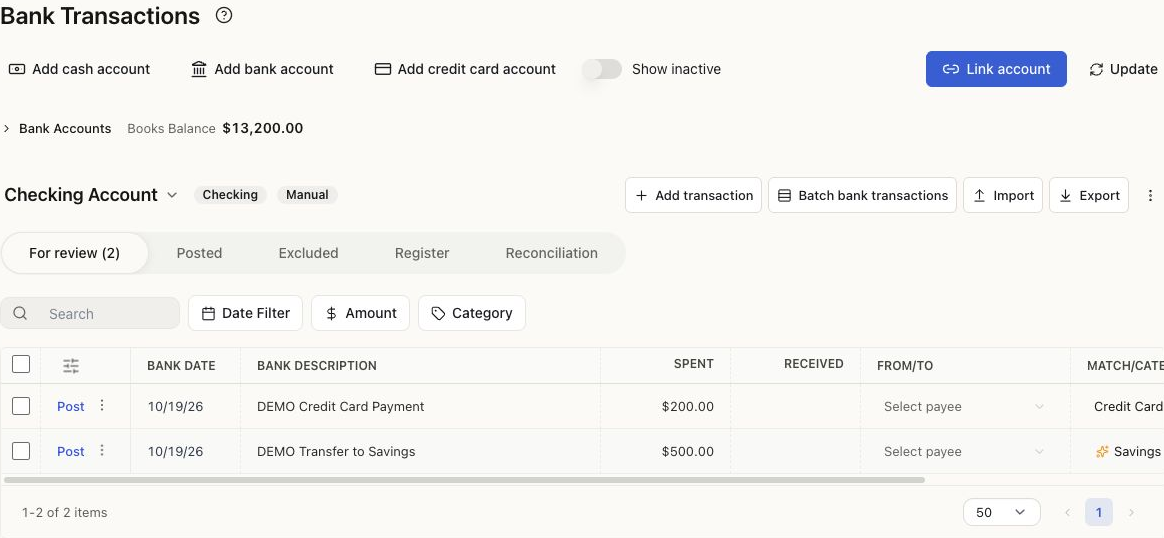
For review separates imported activity from the books. Match a receipt or payment already recorded; categorize a row that needs a new accounting entry. Bank rules can recognize recurring activity from the conditions you set. Suggestions still need review, and a rule with Auto-add enabled can post eligible rows automatically.
- Compare the amount, date, account and reference before matching
- Use transfer or credit card payment treatment where appropriate
- Limit rules by account, direction and clear matching conditions
- Keep Auto-add off while testing a new rule
Reconciliation
Reconcile recorded activity to your statement
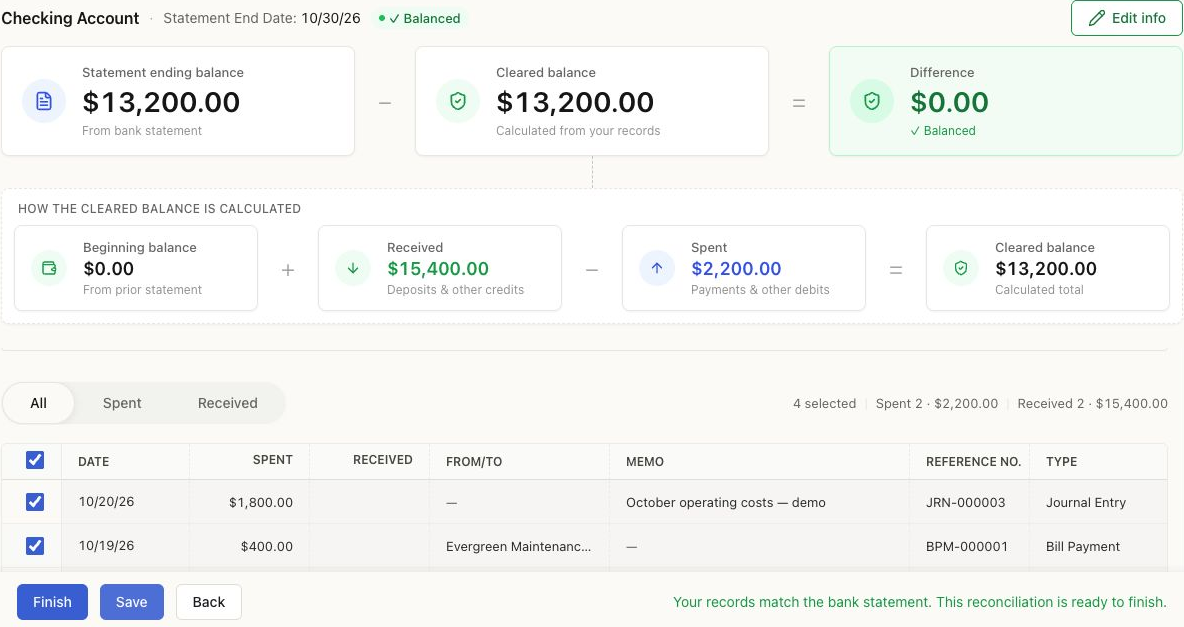
Open Banking → Reconcile. Select the account, enter the statement end date and ending balance, and verify the beginning balance. Select recorded transactions that actually cleared on that statement. Investigate missing or duplicate entries until the difference is zero; Save keeps a draft and Finish completes the reconciliation.
- Check the beginning balance against prior reconciliation or opening records
- Outstanding items can remain uncleared for the next statement
- A zero difference is a checkpoint, not proof every category is correct
- Accounting → Period Close remains a separate month-end step
Cash Flow
Review cash, invoices, and bills
Review recorded cash movements alongside unpaid customer and vendor balances. Statement of Cash Flows explains past movements; invoices, bills, and aging reports help you prepare your own plan. Expected payment timing belongs in a separate forecast, not in the historical report.
- Recorded cash and bank balances to reconcile
- Unpaid invoices to review with customers
- Unpaid bills to plan with vendors
- Historical Statement of Cash Flows
A practical banking workflow
From a bank row to reconciled books
- 1
Bring in the activity
Connect an eligible account through Plaid on Standard or Pro, or import a supported bank file on any plan. Confirm the account, currency, date range and import results.
Bank import walkthrough → - 2
Match before creating
Open For review. Match an existing receipt or payment when one is already recorded. Otherwise review the category, tax and source details before posting a new record.
Review and match transactions → - 3
Check rules and exceptions
Define the account, direction and conditions for each rule. Test the results before turning on Auto-add. Review transfers, card repayments, refunds and possible duplicates separately.
Set up a bank rule → - 4
Reconcile to the statement
Enter the statement end date and balance, then select the recorded transactions that cleared. Investigate differences and outstanding items. Save keeps a draft; Finish completes the reconciliation.
Reconciliation walkthrough →
Worked example · USD
How the demo reaches a $0 difference
Cedar & Pine Home Services (Help Demo) has four posted Checking Account transactions through October 30, 2026. The received total includes $10,000 of opening funds and $5,400 of service receipts; it is not all sales revenue. The spent total includes a $400 bill payment and $1,800 of operating costs.
The screenshot shows a saved draft against a fictional statement balance. The $200 card payment and $500 transfer still in For review are unposted and excluded from this calculation. No real bank connection or payment was used.
A zero difference is a balance check, not proof that every category or date is correct. Review the sources and outstanding items before selecting Finish. Closing an accounting period is a separate action.
See the same transactions in the general ledger →For your own statement, download the free bank reconciliation Excel template. The worked example shows how to find a missed bank fee.
| Beginning cleared balance | $0.00 |
|---|---|
| Received — 2 recorded transactions | +$15,400.00 |
| Spent — 2 recorded transactions | −$2,200.00 |
| Cleared balance | $13,200.00 |
| Fictional statement ending balance | $13,200.00 |
| Difference | $0.00 |
Plans and requirements
Check access before you connect or import
Free: import and reconcile
Bank-file import and reconciliation are available on Free. CSV, XLSX and XLS use column mapping; OFX, QFX and QBO contain structured bank activity. Files can be up to 5 MB. A QBO bank file is not a complete QuickBooks company backup.
Free allows 20 records per month for each capped sales or purchase record type. Categorizing a bank row into a new capped record uses that allowance; simply importing a review row is different from creating the accounting record.
Standard and Pro: automatic feeds
Plaid bank feeds require Standard, Pro or an active Pro trial. There is no separate Bokeping bank-connection fee. Supported institutions, authentication steps and sync timing depend on the bank and Plaid.
Company permissions still control access and actions on every plan. Configure Auto-add rules carefully: eligible matching rows can post automatically. Bank-pending activity may need to settle before posting.
Check current plans and allowances, or follow the bank connection guide before getting started.
FAQs
Banking plans, imports and reconciliation questions
Bring your bank activity into the same books
Start with a file import or use automatic bank feeds on Standard and Pro. Review your records, then reconcile to the statement.
Keep exploring
The rest of Bokeping
Invoicing & Sales
Professional invoices, estimates that convert, and payments that post themselves.
Learn moreBills & Purchases
Track what you owe, pay it on time, and know where every dollar went.
Learn moreInventory
Know what’s in stock, where it is, and what it really costs you.
Learn moreReports & Accounting
Real double-entry books, readable statements, and numbers that tie out.
Learn moreReady to know your money?
Free plan, no card needed. Bring your QuickBooks or spreadsheet history, invite your accountant, and start reading your own books today.