 Bokeping
Review bank transactions
Choose when to match, categorize, or exclude imported bank activity.
In BokepingBanking → Bank transactions
Use Banking → Bank transactions to decide how imported bank activity belongs in your books. Select the bank or credit card account, then open Pending.
The Pending tab is your review queue. A bank transaction marked pending by the bank has not necessarily settled yet; that is a different status from simply being in the review queue.
Choose the right action
Section titled “Choose the right action”| Action | Use it when | Example |
|---|---|---|
| Match | The payment, deposit, or other accounting record already exists. | You recorded a customer payment and now see the bank deposit. |
| Categorize | The bank activity needs an accounting entry and is not already recorded. | A bank service charge has not been entered yet. |
| Exclude | The imported row should not be added to these books. | The same statement transaction was imported twice. |
A transfer between your own accounts is not sales income or an operating expense. Use the appropriate transfer or credit card payment treatment rather than choosing an income or expense category just to clear the queue.
Review a row
Section titled “Review a row”- Open Banking → Bank transactions and select the correct account card.
- In Pending, check Bank Date, Bank Description, Spent, and Received against the statement.
- Use Match/Categorize to inspect the row. Review any suggested match; a similar amount alone is not enough.
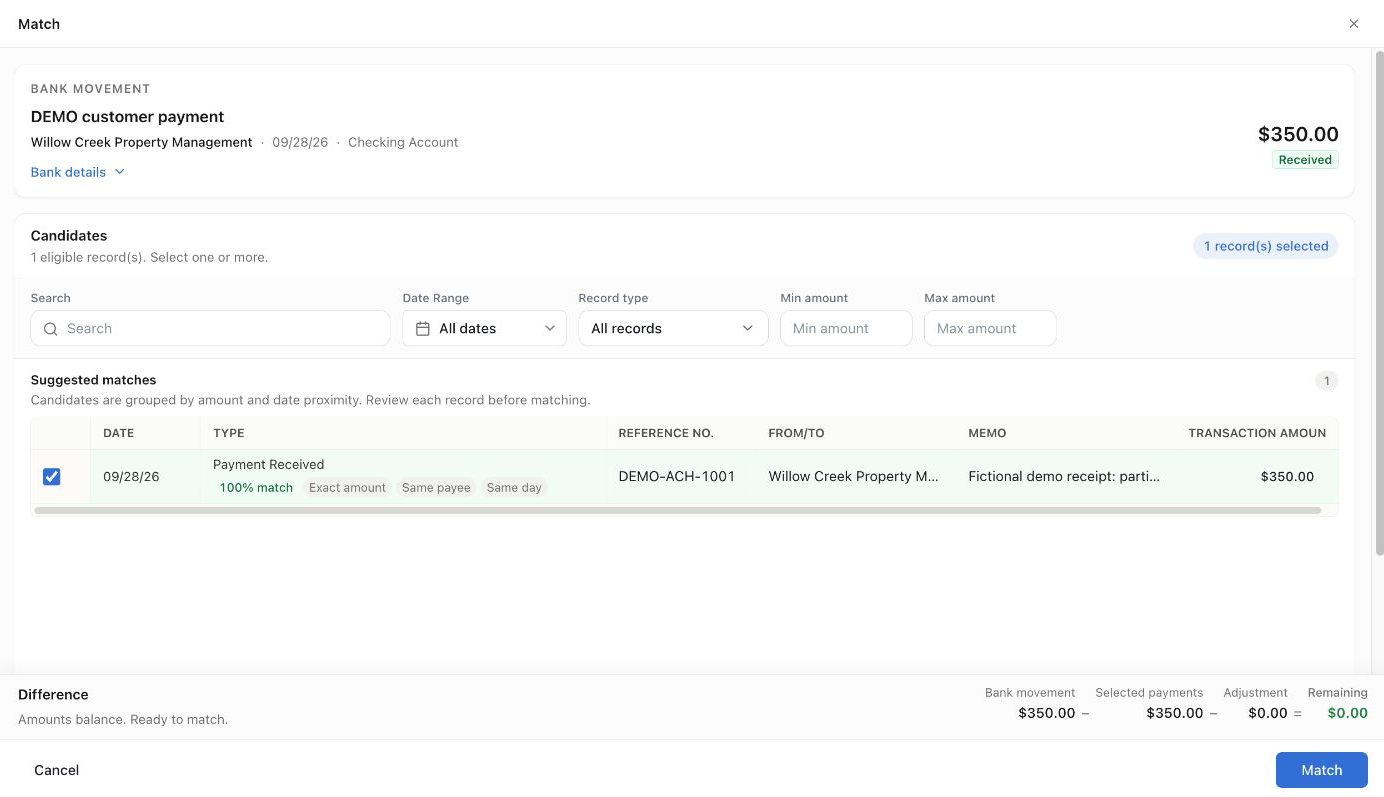
- For a match, compare the account, amount, date, and transaction reference. If the existing record is a bill or invoice, review the settlement details the matching flow requests.
- For a new entry, choose Categorize, select the transaction type and appropriate account, and complete the required details before posting.
- Check where the row appears afterward and verify the linked or created accounting record.
If the app says a transaction is awaiting the bank or needs review, follow that status before trying to post it again. Do not create a second entry to bypass a pending-bank restriction.
Example: match an existing $350 receipt
Section titled “Example: match an existing $350 receipt”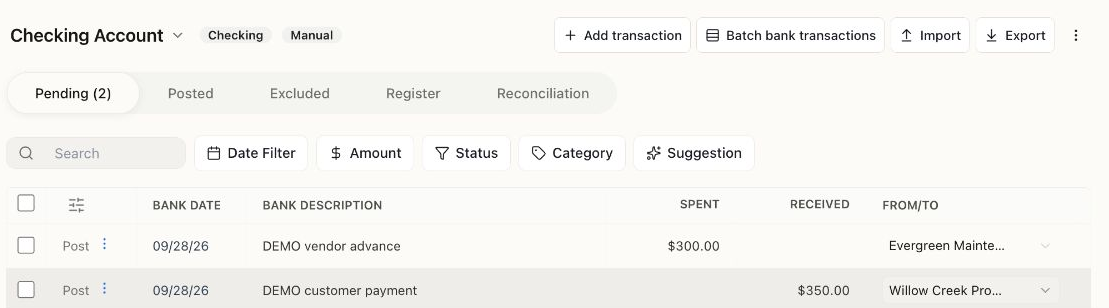
Pending contains imported bank activity waiting for review. These two rows correspond to existing bookkeeping records; they are not two new sales or expenses.
Open Match on the customer receipt. The candidate has the same $350, customer, date, and reference DEMO-ACH-1001. Check those details and confirm Remaining $0.00. A high match score is a suggestion, not a substitute for checking the statement.
This match was saved successfully. The row moved to Posted and linked to PAY-000001. The Demo checking book balance remained $50; no additional receipt was created.
Matching a bank receipt does not allocate its unapplied amount to an invoice. Check invoice settlement separately in Payments Received.
Understand the tabs
Section titled “Understand the tabs”- Pending: imported activity that still needs review, including rows waiting for bank confirmation.
- Posted: activity processed through the review workflow. Open the record to check its accounting treatment.
- Excluded: imported rows set aside from posting. Review this tab when a transaction seems to be missing.
- Register: recorded activity for the account.
- Reconciliation: the account’s statement-reconciliation workspace.
Use the search box and Date Filter to narrow the list before deciding that activity is missing.
Avoid the most common duplicate
Section titled “Avoid the most common duplicate”Suppose you have already recorded a $500 customer payment. When the $500 bank deposit arrives, match it to the payment. Categorizing it as new sales income would count the same receipt twice.
Excluding a feed row does not reverse a separate invoice, bill, or payment already in your books. Check those records individually before correcting a mistake.
Next: Reconcile a bank account. Matching answers “What is this transaction?”; reconciliation checks whether the recorded activity agrees with the statement.
For specific situations, see duplicate bank transactions and credit card payments.
If one new bank row contains several account components, see split a bank transaction. A loan repayment is a common example: principal and interest have different effects.