 Bokeping
Record a customer payment
Apply money received to one or more invoices and check any remaining customer credit.
In BokepingSales & Receivables → Payments Received
Use this workflow when a customer has already paid you. Recording a receipt documents the payment; it does not charge a card or collect money from the customer.
Before you begin
Section titled “Before you begin”Have the customer, payment date, actual amount received, deposit account, and payment reference ready. Check Payments Received for an existing receipt, including one created by an online payment, before adding another.
Record and allocate the receipt
Section titled “Record and allocate the receipt”- Open Sales & Receivables → Payments Received → Record Payment.
- Select Customer, the actual Payment Date, and Deposit Account.
- Enter the total in Amount Received. Add Payment Method and Reference No..
- In Invoices to pay, enter the allocation in Payment Amount beside each invoice the customer intended to pay. Review any prefilled amounts.
- Compare Amount Applied with Amount Received. Unapplied Amount is money left for this customer after the allocations.
- Choose Save and read any unapplied-payment confirmation before proceeding.
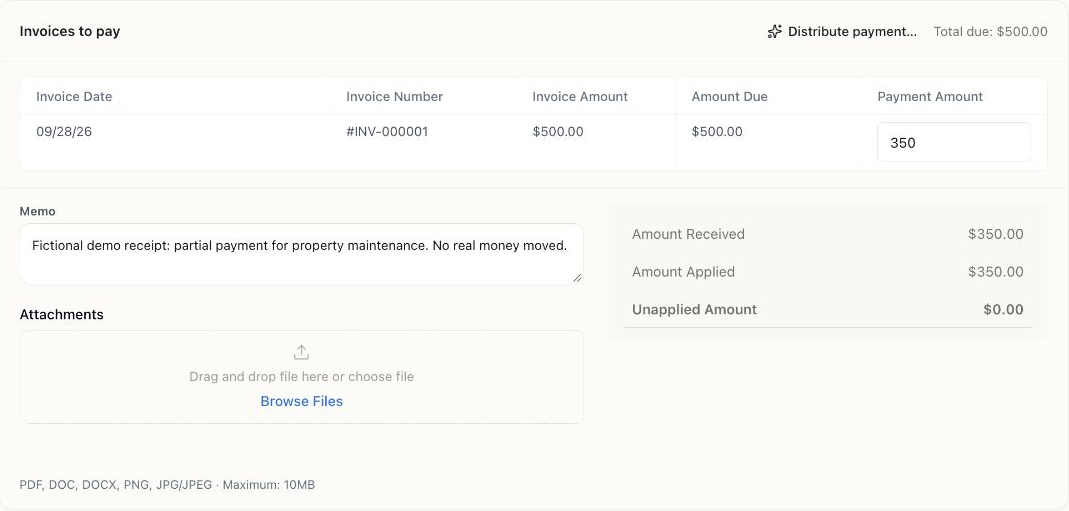
Cedar & Pine demo: the customer paid $350 toward a $500 invoice. Amount Due shows the invoice balance before this payment is saved.
Check the result
Section titled “Check the result”For an illustrative $500 invoice and a $350 receipt, apply $350 to that invoice. The invoice should still have $150 due, and this receipt should have $0 unapplied. Do not change the invoice total to $350.
Open the saved invoice and check Invoice activity for the $350 receipt and its payment number. In Payments Received, confirm Applied to points to the intended invoice and Unapplied Amount is $0. See the partial-payment example for the resulting invoice view.
For $550 received against the same $500 invoice, apply $500 and leave $50 unapplied. Follow partial and excess payments for the next decision.
When the bank feed arrives, match it to the existing record instead of categorizing it as another sale. If you used a holding account, match the eventual deposit to the bank-deposit record as appropriate.
If the invoice is missing
Section titled “If the invoice is missing”Check the company, customer, invoice status, and remaining balance. Already-paid invoices do not need another allocation. If no invoice exists yet, read the current customer-deposit limitation before trying to save an unallocated receipt.