 Bokeping
Record a bill payment
Allocate an actual vendor payment to bills and verify what remains unpaid.
In BokepingPurchases & Expenses → Payments Made
Record a bill payment after money has actually been paid through your bank or payment method. This bookkeeping action does not instruct the bank to send money.
Before you begin
Section titled “Before you begin”Check the vendor’s bills, existing payments, and open balances. Have the payment date, account, amount, and bank reference ready. If the purchase was already recorded as a direct expense, do not also create a bill payment for it.
Allocate the payment
Section titled “Allocate the payment”- Open Purchases & Expenses → Payments Made and start a new payment.
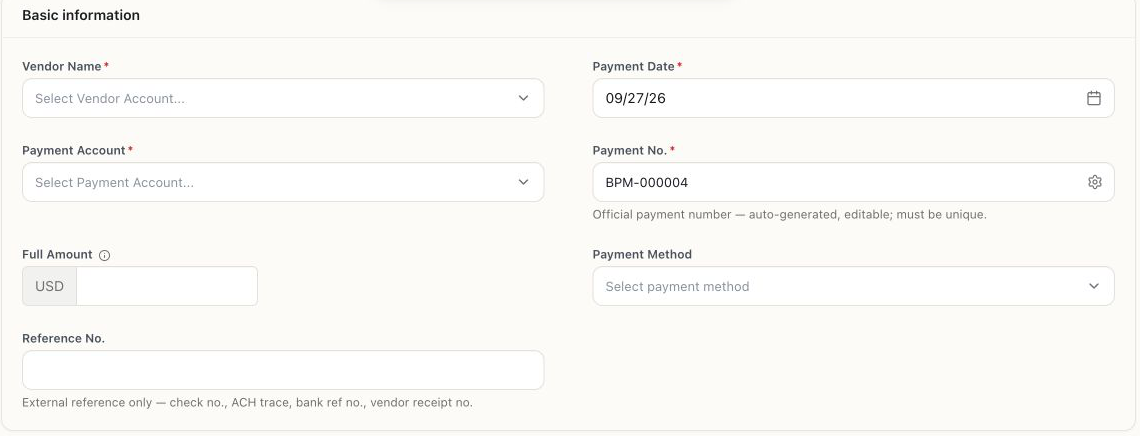
- Select Vendor Name, Payment Date, and Payment Account. Review Payment No..
- Enter the total money paid in Full Amount, then add Payment Method and Reference No..
- Under Bills to pay, identify each bill using its number and Available to apply. Enter the portion paid in each row’s Payment Amount.
- Review Applied to bills, Excess (unapplied prepayment), and Total paid. For a payment fully allocated to bills, excess should be $0.
- Choose Save and review any confirmation. Check both the payment record and the bills’ remaining balances.
Example: one payment, two bills
Section titled “Example: one payment, two bills”These are illustrative amounts with no fees or adjustments. A $900 bank payment pays a $500 bill in full and $400 of a $700 bill.
| Check | Expected amount |
|---|---|
| Full Amount / Total paid | $900 |
| Applied to bills | $900 |
| Excess | $0 |
| First bill remaining | $0 |
| Second bill remaining | $300 |
When bank activity arrives, match the $900 withdrawal to this payment. Do not enter another $900 expense.
When the totals differ
Section titled “When the totals differ”An excess can be a genuine vendor prepayment or a mistaken allocation. Do not change the cash amount just to hide the difference. Record only real, supported adjustments with the appropriate account; a discount, fee, and advance are different events.