 Bokeping
Pay a vendor before receiving the bill
Record an advance once, then apply it from the bill without rewriting the original bank payment.
In BokepingPurchases & Expenses → Payments Made
You pay a supplier $300 before receiving a $1,000 bill. Record the $300 once as an unapplied prepayment. Later, use the bill’s Apply credits action so $700 remains due.
Record the advance
Section titled “Record the advance”- Check Purchases & Expenses → Payments Made for an existing payment.
- Start a new payment. Select Vendor Name, the actual Payment Date, and Payment Account.
- Enter $300 in Full Amount and add the payment method and reference.
- Leave Bills to pay allocations at zero for this future purchase. Check that unrelated open bills have not received prefilled allocations.
- Confirm Applied to bills is $0, Excess (unapplied prepayment) is $300, and Total paid is $300.
- Choose Save, review the unapplied-prepayment confirmation, then choose Save payment.
Bokeping records the unapplied amount in Vendor Prepayments, an asset account. It is distinct from a purchase-related Vendor Credit. Check that asset separately from Accounts Payable until the advance is applied; do not assume an open bill has already been reduced.
If your form or confirmation still says negative A/P or suggests editing the payment later, those hints use older wording. Check the saved payment’s GL Entries for Vendor Prepayments, then use the bill’s Apply credits action below. Do not change the original payment to follow that older prompt.
Apply the advance from the bill
Section titled “Apply the advance from the bill”- Enter and post the bill for the same vendor and the full purchase amount: $1,000 in this example.
- In Purchases & Expenses → Bills, open the bill row’s actions and choose Apply credits.
- Select the original payment by its Source, Transaction No., and date. Enter $300 in Credits to apply.
- Review the application-date controls. Leave Set Applied on Date on and enter the intended Credits applied date. The original payment date remains unchanged.
- Check Amount to credit is $300 and Balance after apply is $700. Choose Apply credits.
- Verify the bill has $700 due and the payment no longer has the $300 available. The original $300 bank withdrawal should remain a single transaction on its original date.
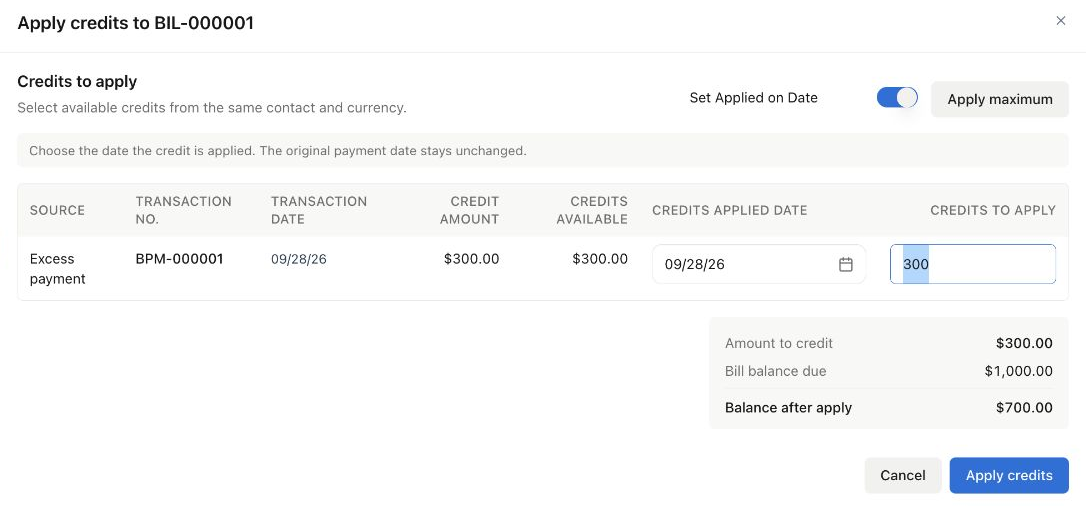
Fictional US demo: the source appears as Excess payment. Use the date of your actual application; the September 28 date shown is only an example.
Do not edit the original payment as the routine way to apply a later advance. The dedicated action can preserve the original bank movement even when an earlier period is closed; the current application must still pass its own date and eligibility checks.
Cross-month example
Section titled “Cross-month example”Illustrative accrual-basis amounts, with no tax, fees, other vendor balances, or adjustments:
| Event | Cash movement | Vendor position to check |
|---|---|---|
| August 20: pay $300 in advance | $300 out in August | $300 Vendor Prepayments asset; A/P $0 |
| September 10: post the $1,000 bill | No new payment | Bill open and A/P $1,000; Vendor Prepayments still $300 |
| September 10: apply the advance | No new payment | Bill open and A/P $700; Vendor Prepayments $0 |
For an ordinary operating-expense bill, the separately tested cash-basis report recognizes the allocated expense in the later application month, while accrual reporting follows the bill date. This report behavior does not determine tax treatment.
Application changes which bill is settled; it does not create another expense or another bank payment. Whether the bill records an expense, inventory, or a prepaid asset depends on the purchase itself.
If the source is missing or the date is blocked
Section titled “If the source is missing or the date is blocked”Check that the bill is posted and unpaid, the vendor matches, and the advance was not already applied, refunded, voided, or deleted. Payments with adjustments may be ineligible. Check the source row’s date and the Set Applied on Date setting before requesting a period reopening.
If a specific historical application date is required, follow date guidance rather than changing original documents. For a purchase-related supplier credit/refund, see vendor credits and refunds. Do not create a purchase credit merely to reverse an unused advance; its source is different.
When bank activity arrives, match the original withdrawal to the existing payment once. See vendor balance differences for the final reconciliation.