 Bokeping
Undo a mistaken bank match or categorization
Return posted bank activity to review while checking what happens to the underlying accounting record.
In BokepingBanking → Bank transactions
If bank activity was matched to the wrong record or categorized incorrectly, inspect the posting before adding a correction. A second entry can make the original error harder to find.
Identify what was posted
Section titled “Identify what was posted”- Open Banking → Bank transactions, choose the correct bank account, and open Posted.
- Find the row by date, amount, and bank description. Review whether it was matched to an existing record or categorized into the books.
- Note the linked record and whether the transaction belongs to a completed reconciliation or closed period.
Use Undo carefully
Section titled “Use Undo carefully”- Choose the row’s Undo action.
- Review the confirmation and its accounting impact before confirming.
- For a match, the action unlinks the bank row from the existing record. For a categorization, the alert explains whether the underlying record will be removed, voided, reversed, or kept. These are not interchangeable outcomes.
- After completion, find the bank row back in review and inspect the original accounting record before matching or categorizing again.
Do not assume every Undo deletes an expense. Do not exclude a genuine payment simply because it was matched incorrectly; exclusion is for activity that should not be entered through that bank row.
Example: wrong receipt selected
Section titled “Example: wrong receipt selected”Two customers each paid $200. A bank row was matched to the wrong customer’s receipt. Undo the match, verify both receipts still represent real payments, and match the bank row using its reference and date. Creating a third $200 receipt would duplicate money received.
If Undo is blocked
Section titled “If Undo is blocked”Read the restriction shown for reconciled or protected activity. Have the person responsible for reconciliation or period close review it before changing those protections. Follow transaction restrictions rather than deleting unrelated records.
A Cleared mark in an unfinished reconciliation draft can also lock the bank row. In the row’s More actions menu, Locked — Cleared may replace Undo. Review the draft and its statement selections with the person reconciling the account; a draft lock does not prove the reconciliation was completed. Do not discard a valid reconciliation simply to make an action available.
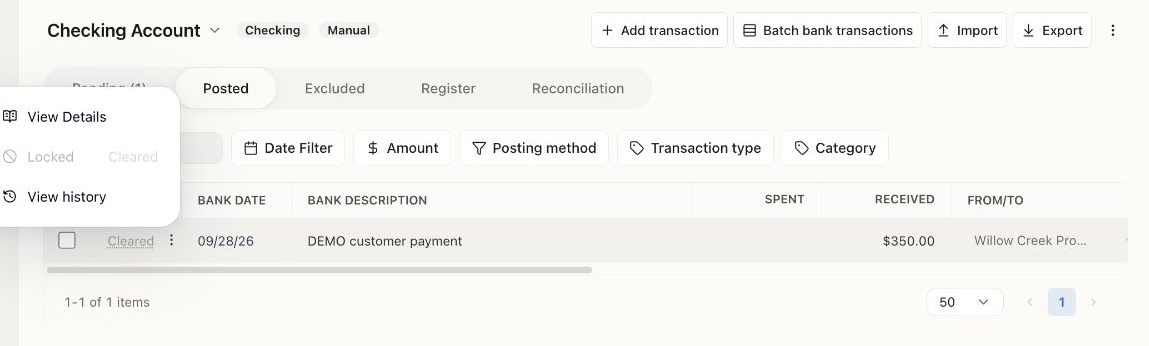
The Demo receipt was matched, but its reconciliation draft already contained a cleared selection. This screenshot shows the blocked action; no unmatch or reconciliation reversal was performed.