 Bokeping
Run and reconcile A/R Aging Summary
Read overdue customer balances and distinguish unapplied payments from the Balance Sheet receivable.
In BokepingReports → A/R Aging Summary
A/R Aging is a snapshot of customer balances at a selected date, arranged by how overdue they are. It is not a list of all revenue earned during a month.
Run the report
Section titled “Run the report”- Open Reports → A/R Aging Summary. The report heading is Receivable Aging Summary.
- Set As Date to the cutoff you want to review.
- Review Aging periods. The usual setup is 30-day intervals and four overdue buckets: 1–30, 31–60, 61–90, and 91+. Current / Not Due is separate.
- Open More actions for customer filters. Clear Specific Customers when checking the whole company, and review whether zero-balance customers are excluded.
- Read the date displayed above the report. Use Refresh report data after correcting source records; check the filters again before exporting or printing.
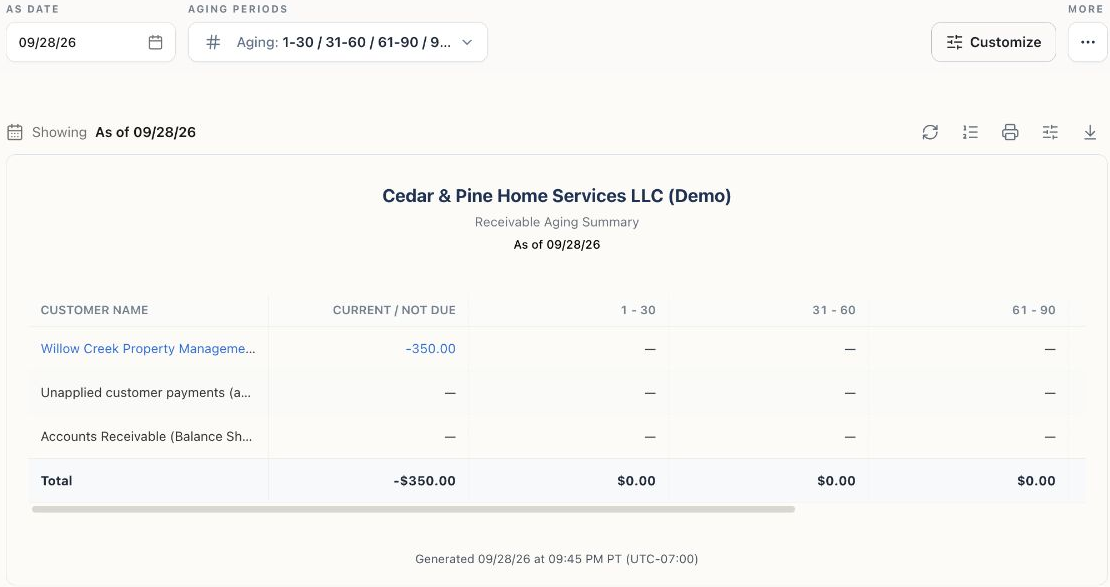
The Demo customer has an unapplied $350 payment and no remaining invoice balance in this snapshot. Scroll horizontally in the app to see the final Total column.
Read the aging buckets
Section titled “Read the aging buckets”A posted $1,000 invoice due August 31 with a $400 payment applied September 15 has $600 outstanding on September 30, in the 1–30 days overdue bucket. If that payment is dated October 1 instead, it should not reduce the September 30 snapshot. This example assumes no other credits or adjustments.
Click a customer name or linked amount to inspect Customer Transactions. Recheck that report’s date range: the link may carry the customer selection without the aging cutoff. Review the original invoice, payment, and credit-application dates rather than comparing only today’s invoice status.
Reconcile the right total
Section titled “Reconcile the right total”Unapplied customer payments can reduce the net customer total while belonging to a separate customer-credit liability in the books. When shown, use the report’s Unapplied customer payments (add back) and Accounts Receivable (Balance Sheet) rows to understand the bridge.
For example, a customer with only a $350 unapplied payment can show −$350 in customer balances. Adding back that $350 gives $0 A/R. This is not an instruction to create a $350 invoice or journal just to eliminate the negative line.
Compare the Accounts Receivable (Balance Sheet) amount with the accrual Balance Sheet at the same date, company, currency presentation, and scope. Open credit memos affecting A/R are different from unapplied cash held as customer credit. Review the source records before combining them.
Investigate a difference
Section titled “Investigate a difference”Check drafts versus posted documents, later-dated payments, unapplied receipts, credit application/release dates, write-offs, and direct A/R adjustments. Clear filters and inspect the affected customer’s transactions. If a paid invoice still appears, use this diagnosis before recording another receipt.