 Bokeping
Split one bank transaction across categories
Allocate one bank amount to multiple accounts and confirm the remaining amount is zero.
In BokepingBanking → Bank transactions
Use a split when one bank transaction represents several accounting categories that have not already been recorded. If the underlying bill payment, customer receipt, transfer, or journal already exists, investigate Match first; a split can otherwise duplicate it.
Where to go: Banking → Bank transactions → select an account → Pending. Choose Review on the row, then Split in the expanded review controls.
Prepare the breakdown
Section titled “Prepare the breakdown”Keep the receipt, lender statement, or other evidence showing the components. Check the bank direction, date, total, and account. A mixed payment must still represent one actual bank movement.
Enter the split
Section titled “Enter the split”- Review the transaction details and Record in account where shown.
- Add at least two complete Split Lines. Select each Category, add a useful Description, and enter its Amount.
- Supply the customer/vendor under Name when the selected account requires one. A/R and A/P categories can require a specific contact; they should not be used as a shortcut around invoice or bill settlement.
- Review the line directions and any negative amount carefully. A negative line is an opposite adjustment, not a way to force an unexplained difference to zero.
- Compare Net split with the bank amount and confirm Remaining is $0.00. For USD, use cents rather than extra decimal places.
- Review all categories and choose Split and post when correct. This posts accounting activity; it is not just a note on the bank row.
- Check the row in Posted and inspect the resulting account activity. Verify that the total bank movement occurred once.
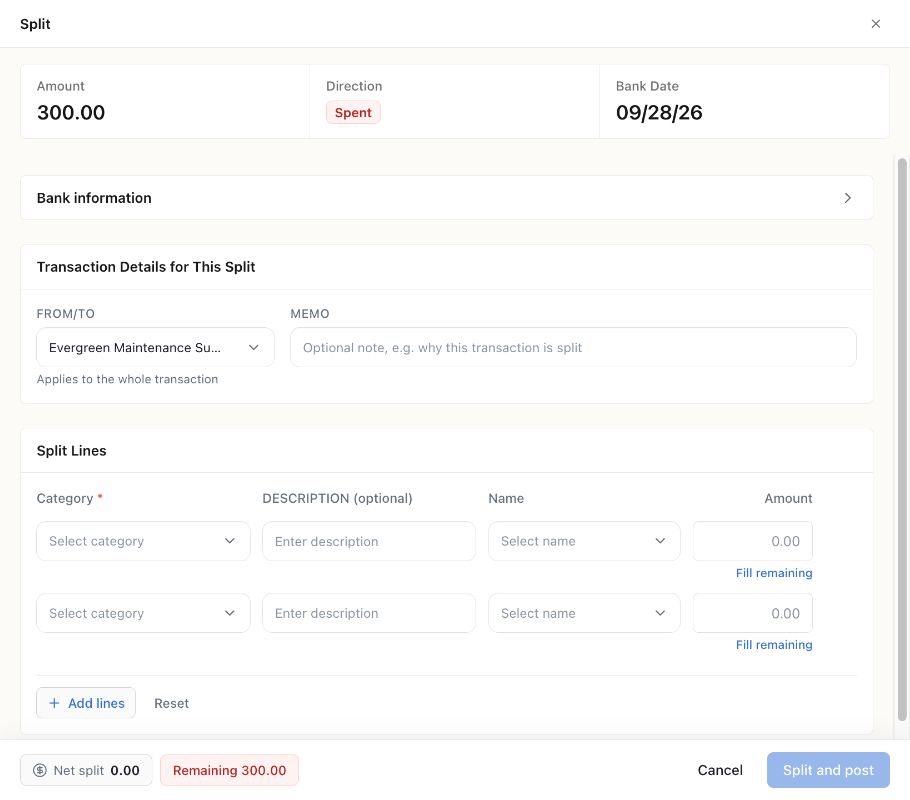
The controls were opened on an existing $300 Demo bank row and canceled without filling or posting. This is a form illustration, not a recommendation to split that vendor advance or record it again.
Example: one $120 payment, two costs
Section titled “Example: one $120 payment, two costs”| Allocation | Amount |
|---|---|
| Office Expenses & Supplies | $100 |
| A separately identified delivery expense | $20 |
| Net split | $120 |
| Remaining | $0 |
Choose accounts that match the actual purchase. Do not add a second $120 expense afterward. For loan repayments, principal and interest require different account treatment.
If you cannot submit
Section titled “If you cannot submit”Check for an empty category, zero line amount, missing required contact, unsupported precision, or a nonzero Remaining amount. An unavailable bank/cash category can indicate that the transaction belongs in the transfer workflow instead. Use account transfers for a movement between your own accounts.
For a row already categorized, posted, matched, or cleared, inspect its existing history before changing it. Re-splitting can replace previous categorization, and reconciliation restrictions may block the change. Follow undo a mistaken posting instead of creating a duplicate bank row.