 Bokeping
Understand your chart of accounts
Choose the right home for each kind of transaction.
In BokepingAccounting → Chart of Accounts
Your chart of accounts organizes the balances and transactions behind your financial reports. Open Accounting → Chart of Accounts to review it before creating more accounts.
An account’s type controls where its activity appears. The account name alone does not determine its accounting treatment.
The five main groups
Section titled “The five main groups”| Group | What it represents | Example |
|---|---|---|
| Assets | Money and other resources the business owns. | Checking account, inventory, equipment. |
| Liabilities | Amounts the business owes. | Vendor bills, credit card balances, loans. |
| Equity | The owners’ interest in the business. | Owner contributions and retained earnings. |
| Income | Amounts earned from business activity. | Product sales or service income. |
| Expenses | Costs of running the business. | Office supplies, rent, and bank fees. |
The form uses more specific Account Type and Detail Type options within these groups. Use the type that describes the balance or activity, rather than the report total you want to change.
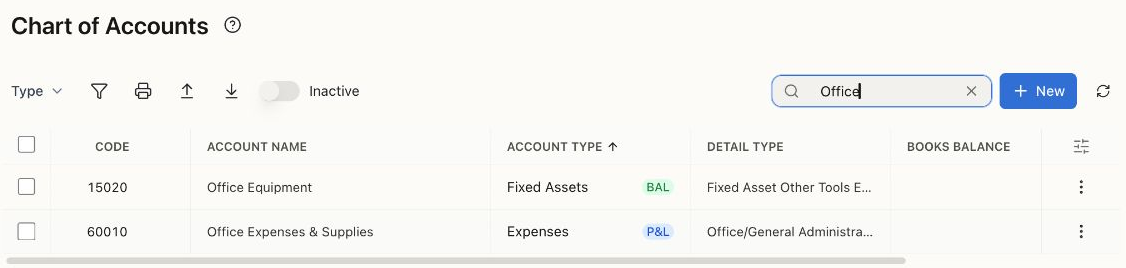
Both names contain “Office,” but the types differ: Office Equipment is a balance-sheet asset; Office Expenses & Supplies is a profit-and-loss expense. The purchase’s nature and your capitalization policy determine which is appropriate.
Create an account
Section titled “Create an account”- Open Accounting → Chart of Accounts. Search existing accounts first and check Inactive if you cannot find one.
- Choose New to open New Account.
- Enter Account Name, then select Account Type and Detail Type.
- Review Account Code. It must be a unique numeric code of up to eight digits.
- If needed, select Make this a subaccount and choose an appropriate parent. Use subaccounts to organize related balances, not to duplicate existing activity.
- Add a description that explains when your team should use the account.
- Use Set Opening Balance only when the account already had a balance before your Bokeping start date. Otherwise leave it unset.
- Choose Create and confirm the new account appears in the list.
Choose accounts on transactions
Section titled “Choose accounts on transactions”The Payment Account on an expense is where the money came from. The Expense Account on its line describes what you bought. For example, a $50 supplies purchase can use Checking as the payment account and Office Expenses & Supplies as the expense account.
For inventory, use the item’s inventory and cost-of-goods-sold settings. Buying stock is not automatically an immediate operating expense. See create a product or service.
If you cannot select or change an account
Section titled “If you cannot select or change an account”Check its type, active status, and any posting restriction shown in the app. Some accounts are controlled by a source workflow, such as customer invoices or vendor bills. A parent configured for subaccount posting may also require you to select the relevant child account.
Do not change an account type or add a balancing journal just to make a report look right. Review the original transactions and ask your accountant when the treatment is unclear.
Related: Prepare your opening balances and read your financial statements.
Related walkthrough
Section titled “Related walkthrough”For item organization and stock locations, use item categories and warehouses. Those are different from ledger accounts.