 Bokeping
Record a partial payment or customer overpayment
Allocate the money actually received and check what is still owed or available as credit.
In BokepingSales & Receivables → Payments Received
A payment does not have to equal an invoice total. Record the amount that actually arrived, then decide how much applies to each invoice.
A customer pays only part of an invoice
Section titled “A customer pays only part of an invoice”For Cedar & Pine’s $500 maintenance-service invoice with a $350 payment:
- Open Sales & Receivables → Payments Received → Record Payment.
- Select the customer, payment date, and deposit account. Enter $350 in Amount Received.
- Find the correct invoice under Invoices to pay and enter $350 in Payment Amount for that row. Check other rows so none receive an unintended allocation.
- Verify Amount Applied is $350 and Unapplied Amount is $0, then save.
- Open the invoice and confirm its remaining balance is $150.
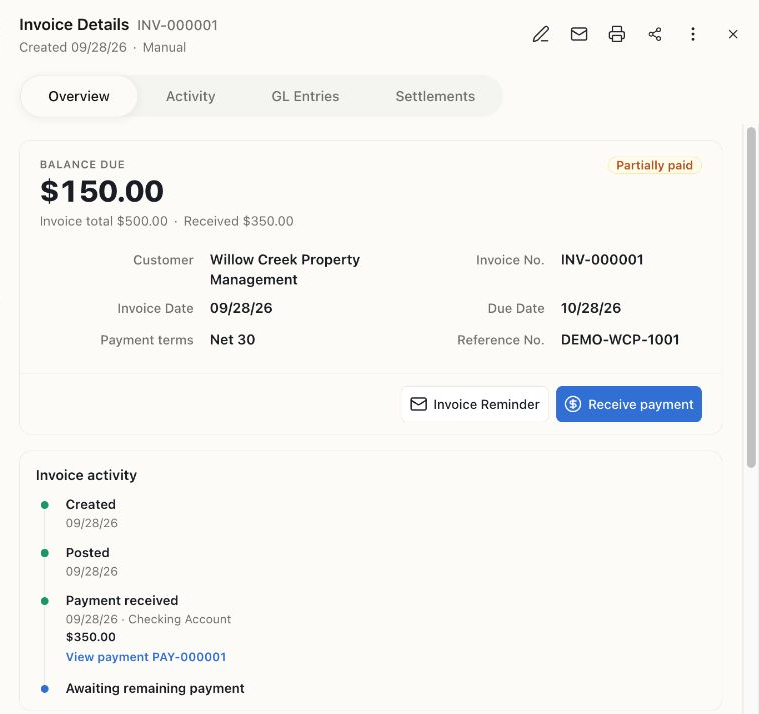
The invoice still shows the original $500 sale. The receipt changes what remains due, not the amount of the sale.
When the remaining $150 arrives, record a separate payment with its actual date. Do not change the original $350 receipt into a $500 receipt.
A customer pays too much
Section titled “A customer pays too much”If a customer sends $550 for a $500 invoice, record $550 received and allocate $500 to the invoice. Review the $50 Unapplied Amount and the confirmation before saving.
The extra $50 remains customer credit. It can be applied to a later invoice or handled through the appropriate refund workflow. Do not increase the sale or invent a fee just to absorb the difference.
One payment covers several invoices
Section titled “One payment covers several invoices”Use one payment for the actual bank receipt, with a separate allocation to each intended invoice. A $900 receipt can pay a $500 invoice and $400 of another invoice. Total allocations must not exceed the amount received or the invoices’ outstanding amounts.
Check before recording another payment
Section titled “Check before recording another payment”A successful online payment may already have created a record. Check Payments Received and the invoice’s payment history before entering a manual receipt. A payment processor’s net payout can be lower than the customer payment because of fees; that is a payout difference, not necessarily a customer underpayment.
Related: Customer deposits and review bank transactions.