 Bokeping
Create an estimate and turn it into an invoice
Quote work, record the customer’s decision, and invoice an accepted estimate.
In BokepingSales & Receivables → Estimates
An estimate proposes a sale. It does not record a payment or create an accounts receivable balance. Use an invoice when you are ready to bill the customer.
Create the estimate
Section titled “Create the estimate”- Open Sales & Receivables → Estimates and create a new estimate.
- Select Customer. Review Estimate No., Estimate Date, Expiration Date, and any Reference No..
- Add each Product/Service, quantity, rate, discount, and tax. Check whether amounts are inclusive or exclusive of tax.
- Add Customer Note and Terms & Conditions for the customer. Memo is internal to your team.
- Review the total. Choose Save as Draft while preparing the quote; review the saved estimate before sending it to the customer.
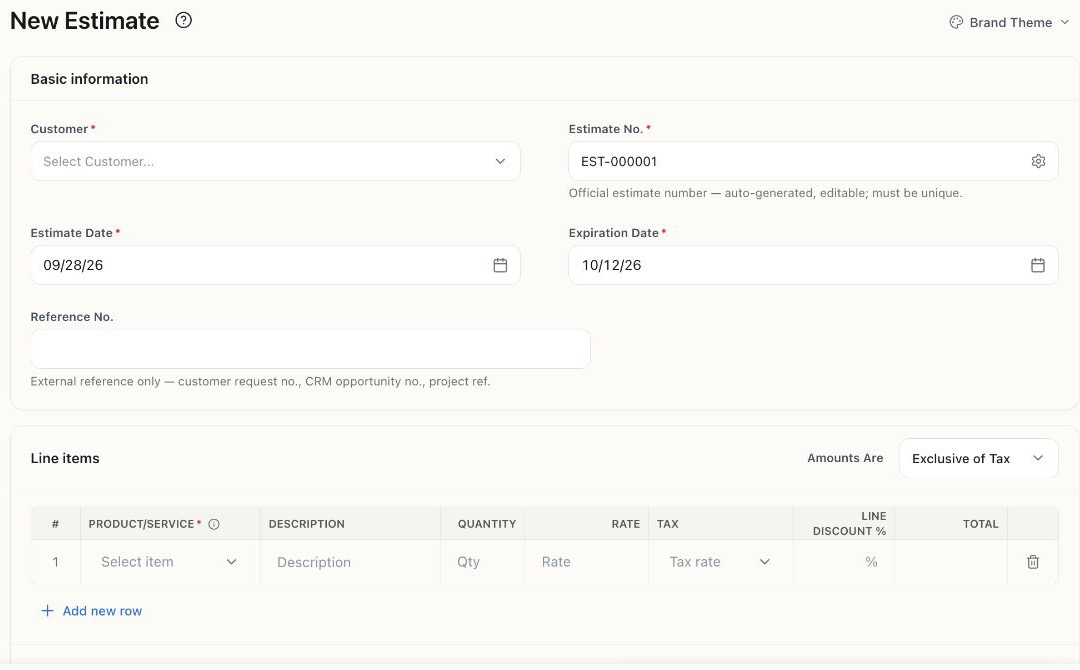
Actual product form. The suggested document number is unsaved; the screenshot contains no customer records.
Record the decision and invoice
Section titled “Record the decision and invoice”| Stage | Next action |
|---|---|
| Draft | Review and send the estimate, or use Mark as sent if you already delivered it separately. Marking it sent does not send an email. |
| Sent | Record Mark as accepted or Mark as rejected based on the customer’s actual decision. |
| Accepted | Choose Convert to Invoice. Review the new invoice’s dates, lines, tax, and total before saving/posting it. |
| Expired | Review the expired quote and revise it before continuing. Acceptance/conversion actions are not available in every status. |
| Converted | Review the resulting invoice rather than creating a second invoice for the same sale. |
Conversion opens a prefilled invoice form; opening that form is not the same as saving an invoice. Check the resulting invoice and estimate status after saving.
If money arrives before the invoice
Section titled “If money arrives before the invoice”Use customer deposits for an advance. Do not make a second sale just to record the money. Later, apply the existing payment to the invoice.
If an action is missing, check the estimate’s status and your permissions. Accepted and converted estimates have restrictions; an edit to an already sent quote should be agreed with the customer.