 Bokeping
Add a customer
Keep customer details ready for invoices and other sales records.
In BokepingContacts → Customers
A customer record keeps the details used on sales documents together. Search for an existing record before adding another one.
Where to go: Contacts → Customers → New.
Enter customer details
Section titled “Enter customer details”- Choose Business or Individual under Customer Type.
- Enter the name information and select or enter the required Display Name. This is how you will identify the customer in your books.
- Add Customer Email if you will email invoices, plus any relevant phone or website details.
- Review the Financial section. The customer uses the company’s base currency. Select Exempt from sales tax only when that treatment applies to this customer.
- Complete Billing Address and Shipping Address as needed. Use Same as billing address when they are identical.
- Choose Save and review the saved record before using it on an invoice.
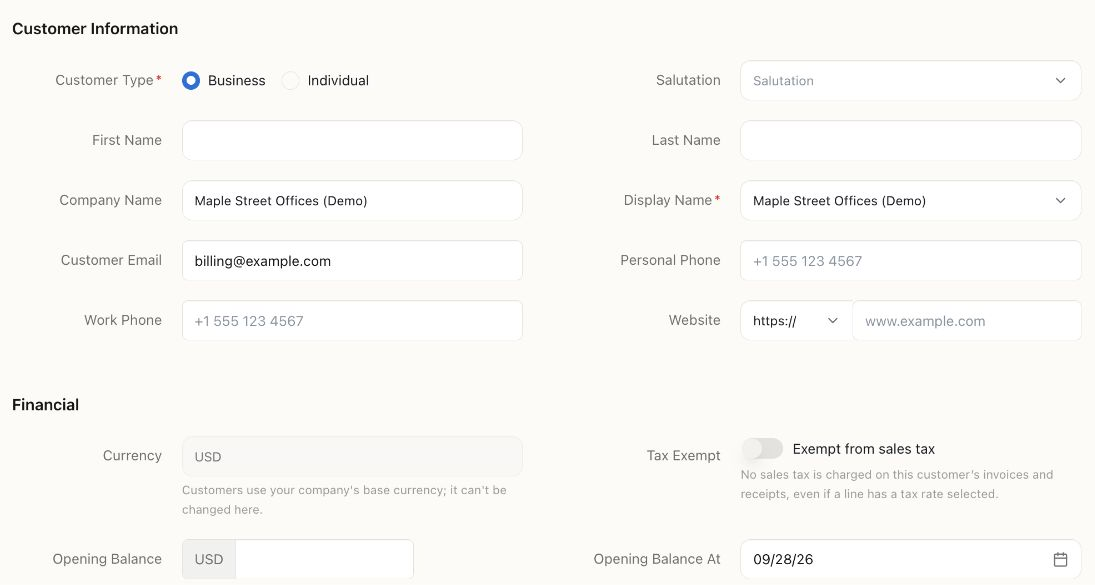
This is an unsaved fictional example. The display name identifies the customer on documents. Leave Opening Balance empty for a new customer who owes nothing; billing@example.com is a demonstration address, not a real recipient.
If the customer already owes you money
Section titled “If the customer already owes you money”Opening Balance and Opening Balance At describe money outstanding at your starting date. If you will import the customer’s unpaid invoices, do not also enter that same amount here.
See prepare your opening balances before bringing old balances across.
Check before invoicing
Section titled “Check before invoicing”Confirm the display name, email, billing address, and tax treatment. A tax-exempt customer can affect tax even when a line has a rate selected, so review the invoice total before sending.
If you cannot find an existing customer, check the list’s search and Inactive switch before creating a duplicate.
Next: Create and send an invoice.
Moving a customer list from another system? Use the contact-import walkthrough to review matching names and opening balances.