 Bokeping
Record a vendor credit or refund
Separate returned goods, price allowances, bill credits, and cash refunded by a supplier.
In BokepingPurchases & Expenses → Vendor Credits
Use a vendor credit when the supplier reduces a purchase you already recorded. Use a vendor advance for money paid before a bill exists. A refund and an application to a bill are different ways to use an available credit.
Choose what happened
Section titled “Choose what happened”| Choice on the credit form | When to use it |
|---|---|
| Returning items to supplier | Goods physically leave your stock. Review the item, quantity, and inventory effect. |
| Price reduction — keeping the items | The supplier reduces the price and you retain the goods. Do not record a stock return. |
| Refund for services or fees | The credit concerns services or fees, with no goods returned. |
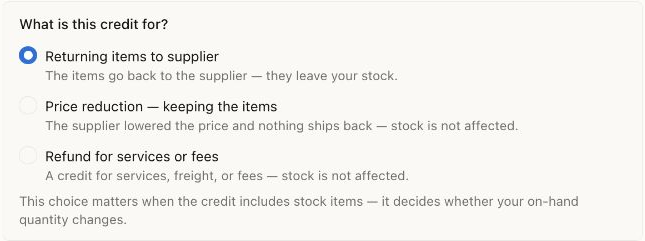
The default is Returning items to supplier. Review this choice deliberately: a price allowance or service refund should not be treated as goods leaving stock. No credit was posted.
Record and review the credit
Section titled “Record and review the credit”- Open Purchases & Expenses → Vendor Credits and create a vendor credit.
- Select the vendor, review the credit date/number, and retain the supplier’s credit reference.
- Choose the credit kind above. Under Enter line items by, choose By item or By category to match the purchase being corrected.
- Enter the credited lines and review the tax treatment and total against the supplier’s document.
- Save a draft if it is incomplete. Review and post the credit before applying or refunding it. Confirm its remaining available amount.
For inventory, do not use an arbitrary expense category to imitate a return. Check stock quantities and value after a physical return.
Apply it to a bill
Section titled “Apply it to a bill”Open the posted credit and choose Apply to Bills. Review the eligible bills for the same vendor, allocation amounts, and application date, then save the application. The destination bill also has Apply credits for eligible sources.
With a $500 unpaid bill and a $100 applied credit, the bill should have $400 due and the credit should have $0 available. The application does not send or receive cash. Never also reduce the bill by $100 manually for the same credit.
Record money the supplier refunded
Section titled “Record money the supplier refunded”If the supplier sends money back instead, open the credit and choose Refund for the still-available amount. Review Refund Date, Deposit to Account, Amount, Reference No., and Description before saving.
A $100 refund increases the selected bank/cash account by $100, or reduces a credit-card liability if returned to that card, and consumes $100 of the credit. It is not new sales revenue. Match the actual bank/card refund to the saved record.
Recording a refund does not request or initiate the supplier’s money transfer. Do not both apply and refund the same $100. If no credit remains, inspect previous applications/refunds before creating another credit.