 Bokeping
Close and reopen an accounting period
Protect reviewed periods with a closing date and document any authorized reopening.
In BokepingAccounting → Period Close
Close a period after completing your month-end review. A closing date protects earlier activity; it is not proof the books are correct or that tax returns have been filed.
Before closing
Section titled “Before closing”Reconcile the relevant statements, review bank items, confirm receivables and payables, and resolve unexplained Trial Balance differences. Review inventory warnings when applicable. Make sure the person setting the closing date has the appropriate authority.
Set the closing date
Section titled “Set the closing date”- Open Accounting → Period Close.
- Choose Set Closing Date or Change Closing Date, depending on the existing status.
- Enter Closing Date and a useful reason for the change. Review the date and the transactions that will be protected.
- Choose Close Books (or Save Closing Date when changing it) and review the preflight results, including unreconciled accounts, bank items awaiting review, and Trial Balance differences.
- Resolve blocking issues. If a confirmation is offered, read its warnings before choosing Confirm and close books.
- Check the resulting closing date and activity history. Do not assume a failed or blocked submission closed the books.
What the closing screen shows
Section titled “What the closing screen shows”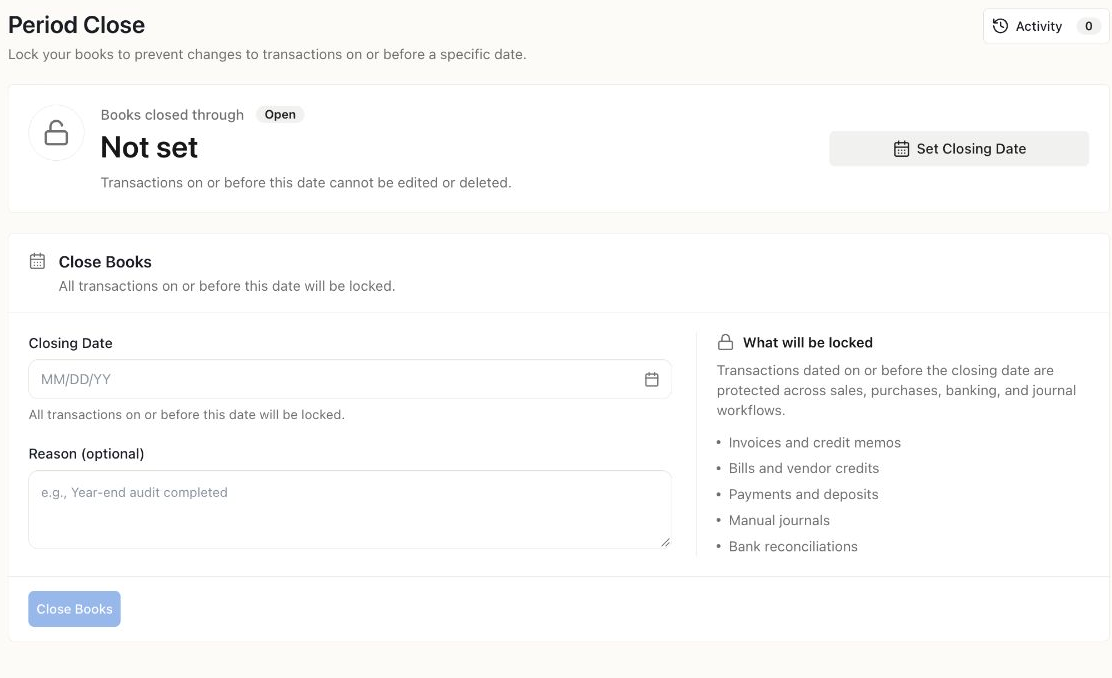
The Demo books are open. No closing date was submitted. Review the date, affected records, and preflight checks before closing your own period.
Reopen only for an approved correction
Section titled “Reopen only for an approved correction”Choose Reopen to open Reopen All Periods, provide the required reason, and review the warning before Confirm Reopen. Reopening removes the closing date and allows changes subject to other permissions and transaction restrictions.
Document the specific correction, compare the affected reports, and close the books again after review. Bank reconciliation and document lifecycle restrictions may still apply; reopening a period does not remove every lock.
Example: a bill found after close
Section titled “Example: a bill found after close”If a missing bill relates to a closed month, ask the person responsible for the books whether to correct that period or use an appropriate later adjustment. Keep the original evidence and decision. Do not silently change the bill date merely to get around a lock.