 Bokeping
Why does a paid invoice still appear overdue?
Check receipt allocations and reporting dates before recording the customer payment again.
In BokepingReports → A/R Aging Summary
A payment in the bank does not always mean it has been applied to the right invoice. An aging report can also intentionally show an invoice as unpaid at an earlier date.
Check the report date first
Section titled “Check the report date first”Open Reports → A/R Aging Summary and confirm the company and reporting date. If an invoice was unpaid on August 31 and paid on September 5, an August 31 report can correctly show it outstanding.
Compare a report as of the payment or application date when checking the later settlement. A current invoice balance and a historical aging balance answer different questions.
Trace the payment
Section titled “Trace the payment”- Open the invoice and check its customer, amount, and payment or credit history.
- Open Sales & Receivables → Payments Received and locate the receipt by reference, date, and amount.
- Check Applied to and Unapplied Amount. The receipt may belong to another customer, have been allocated to a different invoice, or remain unapplied.
- For an available deposit, follow apply a customer deposit rather than entering another receipt.
- Rerun the report after the correction and check the relevant reporting date.
Check the remaining amount
Section titled “Check the remaining amount”A $400 payment against a $1,000 invoice leaves $600 outstanding. A customer promise to pay or a pending provider payment is not the same as a completed receipt.
If a processor paid the bank net of fees, compare the customer’s gross payment with the invoice. The payout difference may be fees rather than an unpaid customer balance.
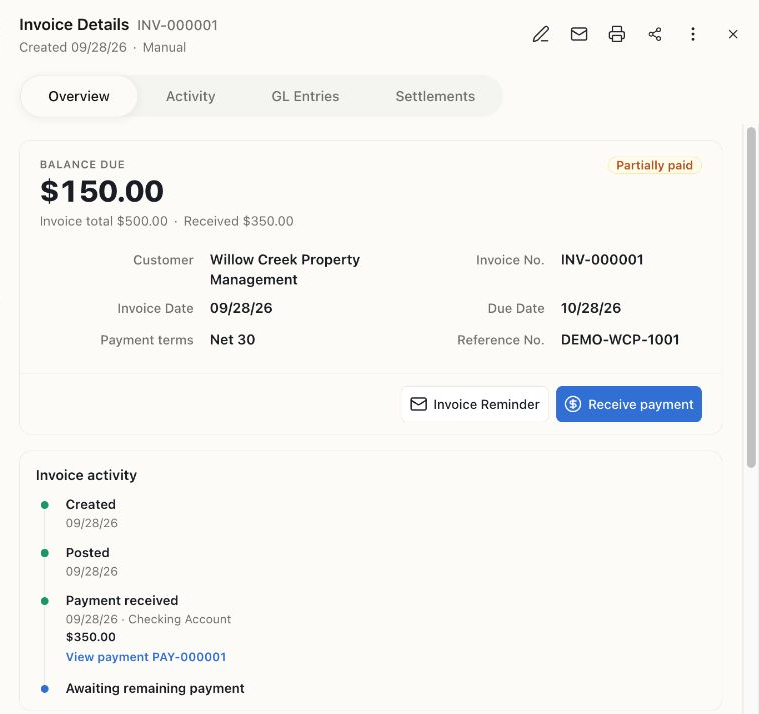
This invoice was partially paid at capture time: $500 less $350 leaves $150 due. Use the saved payment history and the report’s as-of date to distinguish partial payment from a missing allocation.
If the figures still disagree
Section titled “If the figures still disagree”Record the invoice and payment references, dates, amounts, and report filters. Contact support with those details after removing sensitive information. Do not create a balancing credit or a second payment to hide an unexplained difference.