 Bokeping
Record a sale paid immediately
Use a sales receipt for an immediate sale without duplicating an invoice or payment.
In BokepingSales & Receivables → Sales Receipts
Use a Sales Receipt when the sale and payment happen together and no invoice already represents that sale.
| Situation | Use |
|---|---|
| Customer pays for a new sale immediately | Sales Receipt. |
| Customer pays an existing invoice | Payments Received. |
| Customer pays before the future sale is invoiced | Customer deposit. |
| A processor already recorded the sale/payment | Review the existing record and match the bank activity. |
Enter the sales receipt
Section titled “Enter the sales receipt”- Open Sales & Receivables → Sales Receipts → New Sales Receipt.
- Select Customer, review Receipt No., and enter the actual Receipt Date.
- Choose Deposit Account for where the money belongs. Use Undeposited Funds for receipts awaiting a combined deposit; use the appropriate clearing account when a processor still holds the funds.
- Select Payment Method and add Reference No. for the receipt, POS order, or processor transaction.
- Enter the sold Product/Service, quantity, rate, discount, and tax. Review the total.
- Use Save as Draft for unfinished work. Save posts a new sales receipt; verify the posted status after saving.
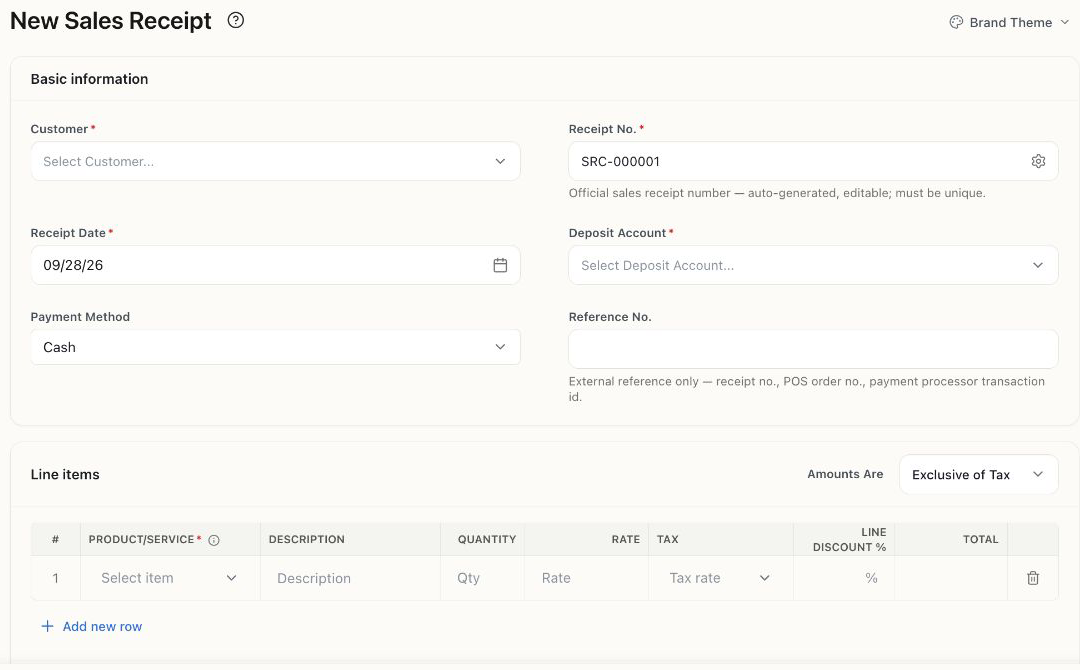
Actual empty form; the suggested receipt number has not been saved.
Check the result
Section titled “Check the result”A posted $200 service sale with no tax or fees records $200 in the selected deposit account and $200 of sales income, without leaving an unpaid invoice. Inventory sales also affect stock and cost of sales according to the item’s setup.
Match the bank deposit to the existing receipt or combined deposit. Do not record another invoice, payment, or income category for the same sale.
Choosing Credit Card as a payment method records how the customer paid. It does not itself charge a card or waive processing fees.