 Bokeping
Find who changed a transaction
Use Audit Log filters and change details to investigate edits without changing the books.
In BokepingAccounting → Audit Log
The Audit Log helps you trace who changed a record and when. Use it alongside the original transaction and accounting reports; an activity event alone is not proof that a ledger balance is correct.
Find the change
Section titled “Find the change”- Open Accounting → Audit Log.
- Set the date range for when the change happened. This may differ from the transaction’s accounting date.
- Search for the record/reference and narrow the results with the available user, action, module, or risk filters.
- Select an event to review its action, actor, timestamp, record reference, and any reason provided.
- Review Before and After values when available. Use View resource where offered to inspect the transaction’s current state.
Check the timezone indicated on the page when comparing timestamps with another person’s report. A midnight event may appear on a different calendar date in another timezone.
Narrow the investigation
Section titled “Narrow the investigation”Choose More filters beside the Date control to find User, Events, Module, and Risk Level. For example, investigate a changed invoice by selecting its module and the date of the change, then inspect the event before editing anything.
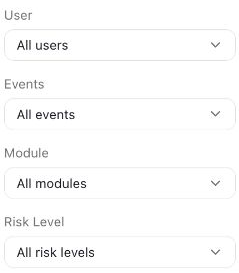
Only the filter controls are shown. User identities and event details are excluded from this screenshot.
Interpret what you find
Section titled “Interpret what you find”| Result | Next check |
|---|---|
| The amount or account changed | Compare before/after values and the current ledger/report. |
| A record was voided or deleted | Check the event reason and its effects on linked documents. A deleted resource may no longer open. |
| No result | Clear filters, widen the change-date range, confirm the company, and check access permissions. |
| No detailed field difference | Retain the event reference and inspect the underlying record; not every event has a field-level diff. |
The Audit Log is for investigation. It is not an undo button. Use the original module’s supported correction workflow, especially for reconciled transactions and closed periods.
If you need support, include the public guide link, module, approximate change time/timezone, and the step you cannot complete. Do not include passwords, access tokens, or bank credentials.