 Bokeping
Record an expense
Record a purchase you have paid for without creating an unpaid bill.
In BokepingPurchases & Expenses → Expenses
Use an expense for a paid business purchase, such as supplies paid for with a business card. Use a bill when you need to track an amount still owed to a vendor.
Where to go: Purchases & Expenses → Expenses → New.
Before you start
Section titled “Before you start”Check whether the purchase already exists as a bill payment or has been posted from Banking. Keep the receipt so you can verify the amount and business purpose.
Record the purchase
Section titled “Record the purchase”- Enter Payment Date, the date the purchase was paid or charged to the card. Do not replace it with the later bank-clearing date merely because the feed arrives later.
- Choose Payment Account, the bank, card, or other supported account that paid for the purchase.
- Select Vendor if available. This is optional in the form, but it helps with vendor reports and applicable contractor tracking.
- Review Expense No. and put an external receipt or bank reference in Reference No..
- In Line items, use By expense account for a category-based expense. Select Expense Account, amount, description, and applicable tax for each line.
- Add a receipt in Attachments if needed. Use Memo for internal context, and a line Description to explain the individual cost.
- Compare the total with the receipt. Choose Save to record the expense, or Save as Draft to finish later.
Payment account versus expense account
Section titled “Payment account versus expense account”For $50 of office supplies paid with your business card, the Payment Account is the credit card account. The Expense Account describes the supplies expense.
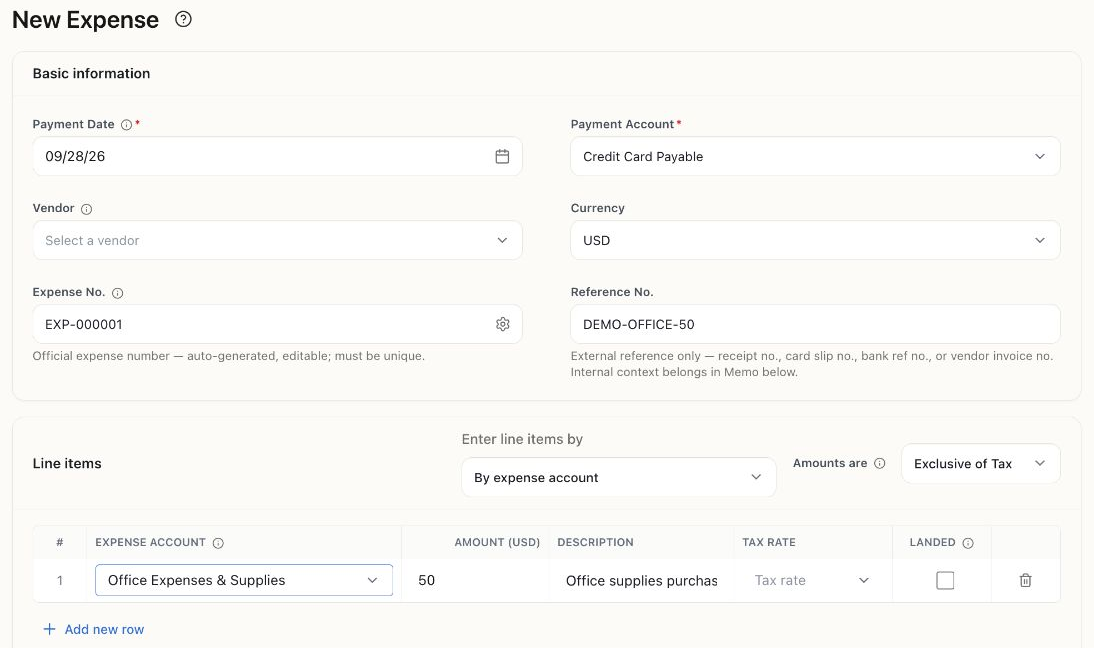
This example was saved as Draft, EXP-000001, for $50. A draft lets you review the account choices before posting; it does not establish that a real card charge occurred.
The card purchase should not also reduce your checking account at the time of purchase. Paying the card bill later is a separate movement between accounts, not a second supplies expense.
Check the result
Section titled “Check the result”Review the saved expense’s status, date, amount, and payment account. When the matching bank or card activity arrives, match it to the existing record. See review bank transactions.
If you are unsure whether a purchase is an operating expense, inventory, or a long-term asset, confirm the account treatment with your accountant before posting it.