 Bokeping
Why does stock in Bokeping differ from my count?
Check item type, dates, opening stock, and source documents before changing inventory quantity.
In BokepingProducts & Inventory → Items
A stock difference can come from a missing transaction, the wrong date or location, an opening quantity error, or a real physical loss. Find which one applies before adjusting the books.
Compare the same stock at the same time
Section titled “Compare the same stock at the same time”- Open Products & Inventory → Items and confirm the exact item and item code.
- Check that it is an Inventory item. Service and Non-Inventory items do not represent tracked stock quantities in the same way.
- Compare the physical count date with the dates of purchases, sales, returns, and adjustments. Include the same location or warehouse scope where applicable.
- Review whether the relevant documents are posted, draft, or voided.
- Check the opening quantity, opening unit cost, and As of date against the original records.
If the books started with 10 units and later include a purchase of the same opening 10 units, the starting stock may have been counted twice.
Quantity and value answer different questions
Section titled “Quantity and value answer different questions”Ten units at $8 each have an $80 inventory value. A physical count verifies the number of units; it does not establish the correct unit cost. A quantity that agrees can still have an incorrect value.
Review Reports → Inventory Valuation with the same date and item scope. Trace unexpected values to the original purchases or opening stock rather than overwriting the item price.
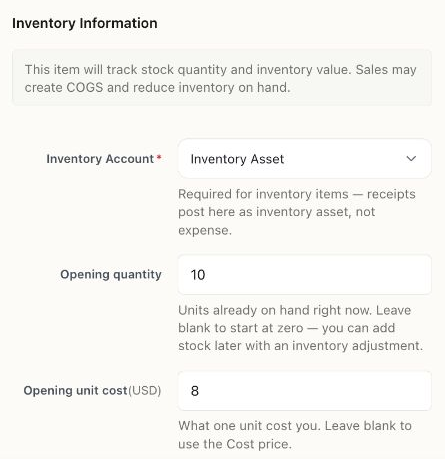
An unsaved illustration of opening stock: quantity 10 and unit cost $8 imply $80. Check the original opening records before adding an adjustment; a selling price is not an inventory cost.
If a stock transaction is blocked
Section titled “If a stock transaction is blocked”Read the message and check the transaction date, available stock at that date, item setup, and location. Stock available today does not necessarily mean it was available on an earlier sale date.
Correct a missing or misdated source document when that is the cause. For genuine damage, shrinkage, or a count correction, review the inventory-adjustment workflow and its accounting effect before posting. Do not insert a fictitious purchase to remove an error.
Related: Create a product or service and prepare opening balances.