 Bokeping
Create a bank rule
Set narrow conditions for recurring bank activity and review automation before enabling Auto-add.
In BokepingBanking → Rules
Bank rules help classify recurring activity. Use them for a pattern whose accounting treatment you understand, such as a recurring bank fee. A rule should not create another record for a payment you already entered.
Set the conditions
Section titled “Set the conditions”- Open Banking → Rules and start a new rule.
- Enter a recognizable Rule Name.
- In Apply the rule to accounts, select the intended accounts. An empty account selection applies to all accounts, so make the scope deliberate.
- Choose the received/spent direction under Apply to transactions are.
- Under Categorize the Transactions When, choose whether all criteria or any one criterion must match, then enter the Field, Condition, and Value for each condition.
- Choose the appropriate Transaction Type and accounting target. Review any From/To, Memo, and Record on fields shown for that type.
- Read Rule Preview to check the combined conditions and outcome. Leave Automatically add to my books off while reviewing a new rule; the list calls this Auto-add.
- Choose Create. Review matching activity before relying on the rule.
Keep the rule narrow
Section titled “Keep the rule narrow”For example, a monthly bank service fee can use Checking Account, direction Spent, and Bank Description → Contains → MONTHLY SERVICE FEE. Assign Expense → Bank Fees and Charges only when that description actually identifies the fee on your bank activity.
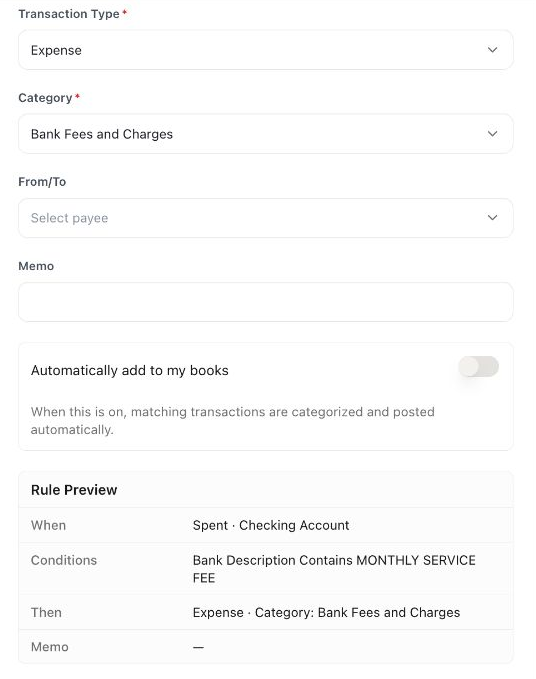
This is a filled preview, not an activated rule. Check the account, conditions, and result together before creating your own rule.
For a bank fee, select the particular bank account and a distinctive description rather than matching every withdrawal. Any condition can match much more activity than All conditions; an amount by itself rarely identifies a business purpose.
Auto-add can post matching transactions directly into the books. Enable it only after checking that the rule is sufficiently specific and does not duplicate existing payments or transfers.
Correct an unexpected result
Section titled “Correct an unexpected result”Review the rule’s account scope, transaction direction, and condition logic. Updating a rule is not a substitute for checking already-posted records. For an incorrect posting, inspect Undo and its impact.