 Bokeping
Prepare your opening balances
Bring your starting balances across without counting the same amounts twice.
Opening balances tell Bokeping where your books start. They should agree with the closing balances from your previous records at an agreed cutover date.
Gather the source records
Section titled “Gather the source records”Prepare a trial balance, bank statements, unpaid customer invoices, unpaid vendor bills, and inventory quantities and values where applicable. Use the same cutover date throughout.
Find the relevant starting fields
Section titled “Find the relevant starting fields”- Accounting → Chart of Accounts → New: Set Opening Balance records an existing balance for a new account.
- Contacts → Customers or Vendors: review Opening Balance and Opening Balance At in the contact form where available.
- Products & Inventory → Items: inventory items use Opening quantity, Opening unit cost, and As of date.
- Bank connection setup: review the starting-balance and existing-account information before creating another opening entry.
These are different ways of bringing existing balances into the same books. Do not enter an amount in more than one place for the same underlying balance.
Enter a starting balance on an existing account
Section titled “Enter a starting balance on an existing account”- Open Accounting → Chart of Accounts and open the intended account.
- Use its opening-balance action to open Add opening balance or Edit opening balance.
- Enter Amount and Date from the agreed cutover records. Review the account’s normal balance direction before entering a negative amount; it is not a universal debit/credit switch.
- Review Offset Account with your accountant. The offset represents the other side of the entry; do not select a random income or expense account to force totals to agree.
- Choose Save, then inspect the account and Trial Balance as of the same date.
Customer, vendor, and inventory opening fields maintain their own supporting records. Use those workflows where appropriate rather than assuming a general-ledger balance alone creates individual unpaid documents.
Choose detail or a summary for each balance
Section titled “Choose detail or a summary for each balance”A customer opening balance creates a special opening invoice for the amount owed; a vendor opening balance creates a special opening bill for the amount payable. These are opening records, not new sales or purchases. One summary per contact does not preserve each original document’s due date or aging history.
| What you need | Migration decision |
|---|---|
| Collect one agreed opening amount per customer | Use the supported customer opening balance and keep the source invoice schedule. |
| Pay one agreed opening amount per vendor | Use the supported vendor opening balance and keep the source bill schedule. |
| Preserve original invoice/bill references and aging | Review a detailed migration plan. Importing ordinary historical documents can also post revenue, expenses, tax, or stock; do not add the same totals again as opening balances. |
| Preserve customer advances, vendor prepayments, credits, or partially settled documents | Keep a separate schedule by contact, original date, amount, and remaining balance. Verify how those balances become available for later application before importing or entering them. |
A general-ledger balance alone is not proof that the right document or credit is available for later settlement. In particular, do not record a historical customer advance as a new current-day receipt while also carrying forward a bank opening balance that already includes it. The same duplication risk applies to vendor advances.
If the available opening fields do not preserve the allocation or credit you need, agree the migration method with support and your accountant before loading that part of the books. The ordinary customer deposit and vendor advance guides describe new money movements, not a shortcut for migrating money already included in opening cash.
Plan the balances
Section titled “Plan the balances”- Agree on the cutover date and account mapping with your accountant.
- Decide whether outstanding invoices and bills will be imported individually or represented through the supported opening-balance workflows.
- Prepare contacts, accounts, and items first. Load the chosen customer/vendor detail and item quantities/values, then reconcile their control-account totals before entering the remaining general-ledger balances.
- Enter the balances using a consistent date and keep the source records for comparison.
- Compare the resulting Trial Balance and Balance Sheet with the old books before entering new activity.
Do not count an amount twice
Section titled “Do not count an amount twice”If you import an unpaid $500 invoice, adding another $500 customer opening balance for that same invoice overstates what the customer owes. The same principle applies to vendor bills and inventory.
A connected bank’s current balance is not automatically the correct opening balance for an earlier cutover date. Use the statement and your source books for the selected date.
Handle outstanding bank items
Section titled “Handle outstanding bank items”The bank statement and book balance can differ for valid timing reasons. For example, a June 30 statement shows $5,000, but a $200 check already recorded in the old books has not cleared. With no other differences, the June 30 book bank balance is $4,800.
Carry the outstanding check on a separate reconciliation schedule. Its later $200 bank debit settles an existing obligation; it is not another expense. Agree how the opening balance and outstanding item will be represented together so the book balance is $4,800 exactly once. Do not load $4,800 and then subtract the same historical check again, or use $5,000 without accounting for it.
Deposits in transit require the corresponding review. If the opening workflow does not expose a suitable matchable outstanding item, resolve that migration setup before finishing the first reconciliation; do not force it with a new sale or expense.
Acceptance checklist
Section titled “Acceptance checklist”Use the same company, date, report basis, and currency for every comparison. A balanced Trial Balance alone is not enough.
| Check | What must agree |
|---|---|
| Trial Balance and Balance Sheet | Each mapped account agrees to the approved cutover schedule, not just the grand total. |
| Customer and vendor detail | Open documents, credits, and advances agree to the corresponding control accounts, with differences explained. |
| Aging | Original due dates are preserved where required, or the limits of summary opening records are documented. |
| Bank and credit cards | Book balance reconciles to the statement plus identified outstanding items. |
| Inventory | Item quantities and values agree to the inventory schedule and asset balance; no duplicate opening journal. |
| Customer advances and vendor prepayments | Remaining amounts belong to the right contacts and can follow the intended application workflow. |
| Opening offsets and equity | Temporary offsets are reconciled to the complete migration. Any remaining balance is explained and approved. |
| Year-to-date results | Reports include the intended pre-cutover results, or the agreed combined reporting process is documented. |
Resolve differences before accepting the migration. Do not make an unexplained balancing journal just to pass the total check.
Related: Prepare records for import and reconcile a bank account.
Worked cutover check
Section titled “Worked cutover check”This is an illustrative reconciliation worksheet, not an import file. Assume these are the only starting balances and no retained profit exists:
| Balance at cutover | Debit | Credit | Supporting detail |
|---|---|---|---|
| Bank | $5,000 | — | Reconciled book balance; no outstanding items in this separate example |
| Accounts receivable | $1,000 | — | One unpaid customer balance |
| Accounts payable | — | $600 | One unpaid vendor balance |
| Owner equity | — | $5,400 | Accountant-approved equity mapping |
| Total | $6,000 | $6,000 |
After loading the agreed records, the Trial Balance should agree with these totals; customer detail should total $1,000 and vendor detail $600. The specific opening workflows may use a temporary equity offset. Reconcile that offset as part of the complete cutover rather than posting the $5,400 equity again without checking existing entries.
Do not replay pre-cutover bank activity already included in the $5,000 balance as new income or expenses. For a midyear change, carry forward the required year-to-date results as part of an accountant-approved plan; this simplified example does not cover every midyear balance.
See the starting-stock fields
Section titled “See the starting-stock fields”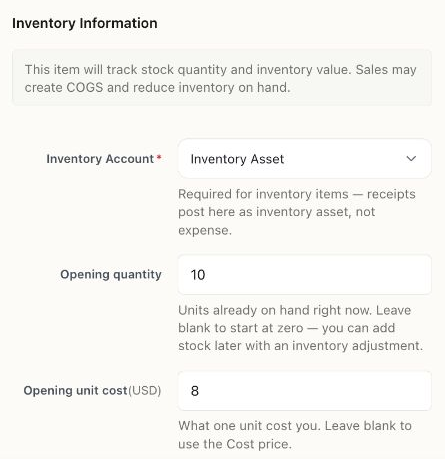
This unsaved item example illustrates the $80 starting-stock calculation. It is not a completed migration and does not demonstrate that all opening offsets have been reconciled.
Use the item setup walkthrough for these fields, and complete the acceptance checklist above for the entire cutover.