 Bokeping
Credit and refund an invoiced sale
Reduce a posted sale, distinguish cash refunds from credits, and check inventory and customer balances.
In BokepingSales & Receivables → Credit Memos
A credit memo reduces a sale or gives the customer a credit. A refund records money returned. Choose the route that matches the original transaction before creating either one.
Choose the route
Section titled “Choose the route”| Situation | Route |
|---|---|
| Deposit or overpayment still unapplied | Refund the original unapplied payment; do not reduce a sale that never occurred. |
| Unpaid invoice needs a reduction | Create a credit memo and apply it to the remaining invoice balance. No cash refund is needed for money never received. |
| Fully paid sale is partly or fully returned | Create the appropriate credit memo, then refund its available credit or leave it on account by agreement. |
| Partly paid sale is canceled | Separate the unpaid balance to be credited from cash actually received and potentially refundable. |
| Provider already reversed a payment or opened a dispute | Review its status and existing Bokeping records first; a second manual refund may duplicate the reversal. |
Create the credit memo
Section titled “Create the credit memo”- Open the original invoice. Where available, use Create Credit Memo from Invoice so the new credit retains its source relationship. Otherwise start from Sales & Receivables → Credit Memos → New, retaining the original invoice reference.
- Check Customer, Credit Memo No., Credit Memo Date, Reason, and Reference No..
- Review every copied line. Keep only the quantities/amounts being credited, with the appropriate tax and discount treatment. A partial return should not credit the whole invoice.
- For inventory, review Return items to stock when shown. Turn it on only when the relevant units should actually return to tracked stock. A price allowance without returned goods should not increase stock.
- Review the total. Save posts the credit; Save as Draft does not make it available for application or refund.
- Inspect the saved credit before proceeding. If an optional Apply to invoice action fails after saving, inspect both records before retrying; do not create a second credit memo.
For returned stock, starting from the original invoice preserves the sale’s cost relationship. A standalone return may use a different cost basis. Review the stock and cost impact instead of also recording a separate inventory increase for the same return.
Example: a $100 service allowance
Section titled “Example: a $100 service allowance”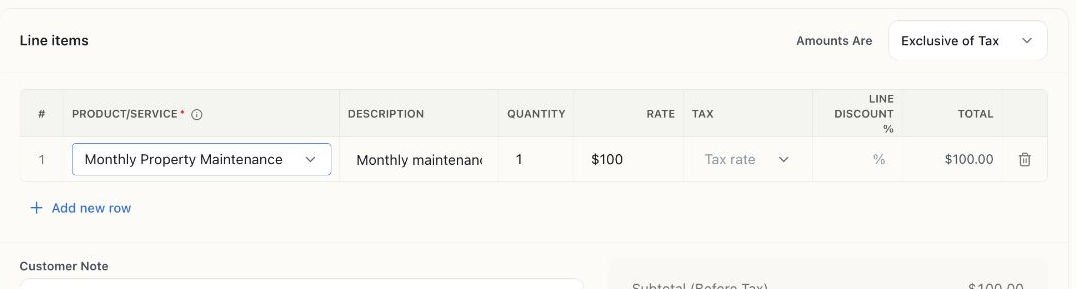
A filled, unsaved service example. The original item price was $500; the credit line was changed to the $100 allowance. No goods are being returned, and no credit or refund was posted.
A service allowance reduces the sale by the agreed amount. If goods are involved, review the source invoice and stock-return choice instead of copying this no-inventory example.
Reduce an unpaid balance
Section titled “Reduce an unpaid balance”Use Apply Credit to Invoice on a posted credit with an available balance, or Apply credits on the destination invoice. Apply only the intended amount and review the date and resulting invoice balance. If a credit should stay available for a cash refund, do not spend that same amount against another invoice.
Record the cash refund
Section titled “Record the cash refund”- Confirm the actual refund through the bank/provider workflow and check whether Bokeping already recorded it automatically.
- For a refund that still needs a bookkeeping record, open the posted credit memo with available credit and choose Refund Credit Memo.
- Review Refund date, From account, and Amount against the repayment. Add its Reference No. and Description.
- Choose Refund to save, then verify the remaining credit and cash account. This form records the bookkeeping event; it does not prove a provider has sent money.
Worked checks
Section titled “Worked checks”These are illustrative accrual examples with no tax, fees, or inventory costs.
| Original situation | Credit and refund | Expected result |
|---|---|---|
| $500 service invoice paid in full; $100 allowance refunded | $100 credit memo; $100 cash refund | Net sale $400, net cash retained $400, no remaining customer credit |
| $1,000 service invoice with $400 paid; entire sale canceled | $1,000 credit memo; $600 applied to the outstanding invoice; $400 refunded | Original invoice due $0, credit remaining $0, net sale and cash retained $0 |
The original receipt remains part of the audit trail. Do not delete a genuine historical payment to represent a later refund. With tax, stock, processor fees, or prior credits, reconcile those components separately before considering the return complete.