 Bokeping
Create a manual journal
How to create a manual journal entry: record a reviewed accounting adjustment with balanced debits and credits.
In BokepingAccounting → Manual Journals
Use a manual journal for an accounting adjustment that belongs outside a normal invoice, bill, receipt, or payment workflow. Have the accounts, date, amounts, and reason reviewed before posting.
Enter the journal
Section titled “Enter the journal”- Open Accounting → Manual Journals and start a new journal.
- Set Journal Date, review the journal number, and add a Reference to the supporting calculation or document.
- Add the required account lines with their debit or credit amounts and descriptions. Fill any required contact or other fields for the selected account.
- Check that total debits equal total credits and that every account reflects the intended business event. Equal totals do not prove the accounts or date are correct.
- Add a clear Memo and retain the supporting calculation.
- Choose Save and Close when ready to post, or Save and New to post and start another journal. These actions post the journal; they are not draft saves.
- Review the journal and its effect on the affected accounts and reports.
Example: recognize one month of prepaid insurance
Section titled “Example: recognize one month of prepaid insurance”Assume your accountant has already verified that $1,200 is recorded as a prepaid asset for twelve equal months and that one month should now be expensed. This illustrative adjustment is:
| Account | Debit | Credit |
|---|---|---|
| Insurance expense | $100 | — |
| Prepaid insurance | — | $100 |
The prepaid asset falls to $1,100 and this month’s expense increases by $100. No money moves as part of this adjustment. Do not also record a second bank payment.
See the balanced entry
Section titled “See the balanced entry”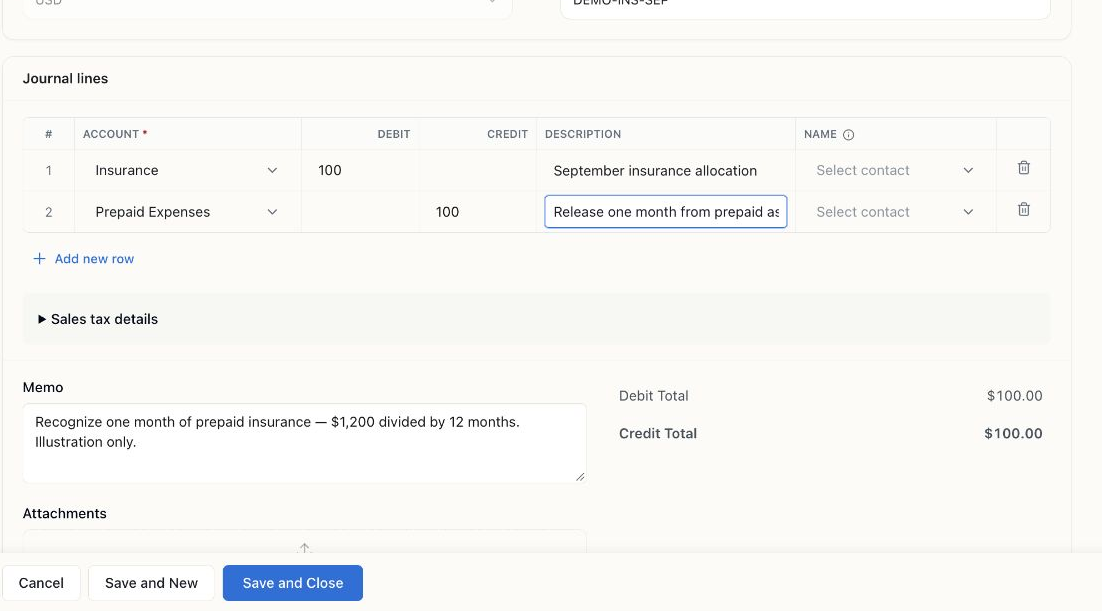
Filled example using Insurance and Prepaid Expenses in the Demo chart. Debits and credits both total $100. The form was canceled without posting; the hypothetical $1,200 prepaid balance was not created.
When to use a different workflow
Section titled “When to use a different workflow”Use customer payments and bill payments to settle documents. A journal to A/R or A/P is not a substitute for allocating a receipt or payment to the intended invoice or bill. The app requires the appropriate contact and validates the direction of customer/vendor adjustments. Cash and sensitive-account warnings are prompts to review the workflow; they do not mean every such account is prohibited. For stock counts, use inventory adjustments so item records and accounting stay connected.
If the period is closed or validation rejects a line, investigate the reason. Do not change a date or account only to bypass a restriction.
Frequently asked questions
When should I use a journal entry instead of an invoice or bill?
Use a manual journal for a reviewed accounting adjustment that belongs outside a normal invoice, bill, receipt, or payment workflow, such as recognizing a month of prepaid insurance. Settle documents with customer payments and bill payments, and use inventory adjustments for stock counts so item records and accounting stay connected. Have the accounts, date, amounts, and reason reviewed before posting.
Does Save and Close post my journal entry or save it as a draft?
It posts it. Save and Close posts the journal, and Save and New posts it and starts another one; neither is a draft save. Before choosing either, check that total debits equal total credits, that every account reflects the intended business event, and that the Memo is clear. Afterward, review the journal and its effect on the affected accounts and reports.
Can I fix a customer's balance with a journal entry to accounts receivable?
Not as a substitute for applying a payment. A journal to A/R or A/P does not allocate a receipt or payment to the intended invoice or bill, so use customer payments or bill payments to settle documents. When you do post an A/R or A/P adjustment, the app requires the appropriate contact and validates the direction of customer and vendor adjustments.
How do I record one month of prepaid insurance?
Once your accountant has verified the amounts, debit insurance expense and credit prepaid insurance for that month's share. In the page's illustrative example, $1,200 prepaid over twelve equal months gives a $100 debit and a $100 credit, leaving $1,100 prepaid. No money moves as part of this adjustment, so don't also record a second bank payment.
Why is my journal entry rejected even though debits equal credits?
Equal totals don't prove the accounts or date are correct. The period may be closed, or validation may reject a line, for example when a required contact is missing or a customer or vendor adjustment goes in the wrong direction. Read the reason and investigate it. Don't change a date or account only to bypass a restriction.