 Bokeping
Read your financial statements
Find the report that answers your business question.
In BokepingReports
Open Reports to choose a report for your business question. A report summarizes the records in the selected company; it does not independently verify that every transaction is correct.
Choose a report
Section titled “Choose a report”| Your question | Report in the sidebar | What to check |
|---|---|---|
| Did the business make a profit? | Profit and Loss | Income, costs, and expenses over a date range. |
| What do we own and owe? | Balance Sheet | Assets, liabilities, and equity as of a date. |
| Where did cash come from and go? | Statement of Cash Flows | Cash movements over a period. |
| Who still owes us? | A/R Aging Summary | Unpaid customer balances and how overdue they are. |
| What do we still owe vendors? | A/P Aging Summary | Unpaid vendor balances and due dates. |
| Which transactions explain an account balance? | General Ledger | Entries in a particular account and period. |
| Do debit and credit totals agree? | Trial Balance | Account balances at the selected date. |
| What is our stock worth? | Inventory Valuation | Recorded quantities and inventory values. |
| What entries make up a journal posting? | Journal | Debits, credits, dates, and document references. |
| What activity belongs to one customer or vendor? | Customer Transactions or Vendor Transactions | Sales/purchases, settlements, and adjustments in the selected period. |
| What is each contact’s balance? | Customer Balance Summary or Vendor Balance Summary | Contact totals; compare advances and credits separately from aging. |
| What did we sell or buy by item? | Sales by Item or Purchases by Item | Item-level activity; these do not replace the complete financial statements. |
| What changed an item’s stock? | Inventory Item Details | Source activity for the same item, dates, and location scope. |
| What sales tax needs review? | Sales Tax Liability Summary | Taxable sales, collected tax, payments, and remaining liability. |
| Which contractor amounts need year-end review? | 1099 Contractor Report | Contractor data and eligible payment information; viewing a report is not filing a tax form. |
On the Reports landing page, Profit/Loss Report opens the report titled Profit and Loss; Balance Sheet Report opens Balance Sheet.
Run a Profit and Loss report
Section titled “Run a Profit and Loss report”- Open Reports → Profit and Loss.
- Choose Report period, or enter From and To dates.
- Under Accounting method beside the period controls, choose Cash or Accrual for the question you are answering. When the toolbar is condensed, look under More actions for the same setting.
- Confirm the displayed date range and the basis printed below the report. Use Refresh report data when you need to fetch the latest records.
- Read income, cost of goods sold, operating expenses, and net income together.
- Select a linked account amount to open its General Ledger detail and investigate the transactions behind the total.
For a Balance Sheet, pay attention to the as-of date. It represents a position at a point in time, rather than profit earned over a range.
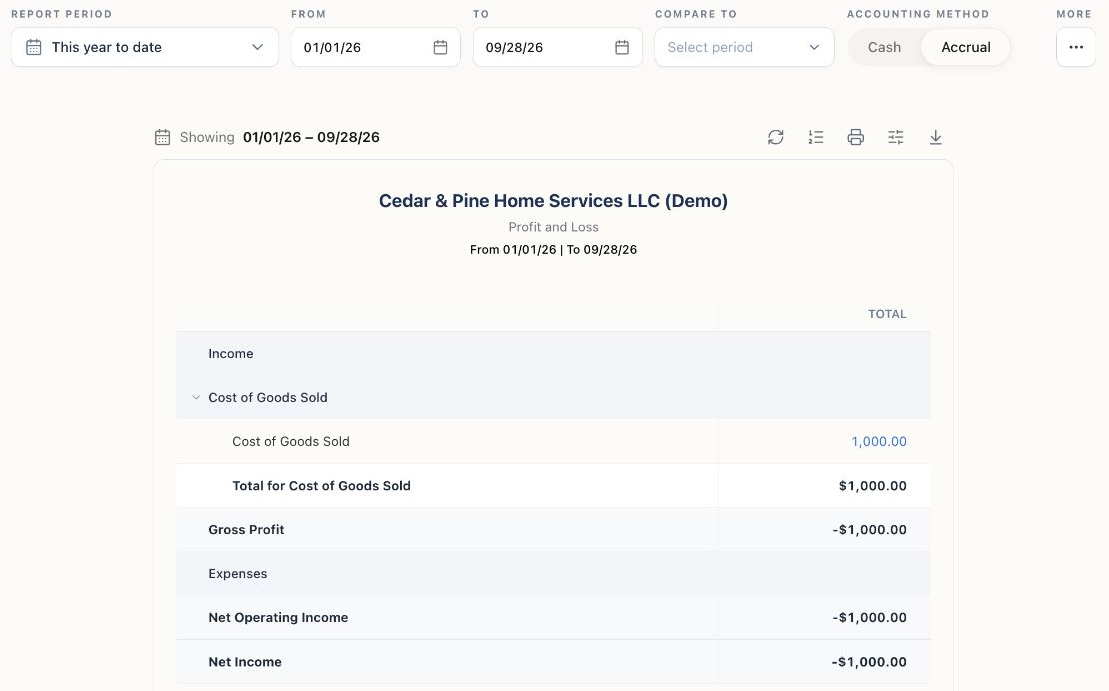
Start with the company, date range, and accounting method. Blue account amounts open the supporting General Ledger. These are the Demo company’s records at capture time, not a target result for your books.
Compare or share results
Section titled “Compare or share results”Use Compare to on Profit and Loss when you want a comparison period. Keep the accounting basis consistent across periods.
Use Export report or Print report in the report toolbar. Review the company, dates, and basis on the output before sharing it; report formats and controls can differ by report.
Why profit and bank balance differ
Section titled “Why profit and bank balance differ”Profit includes business income and expenses under the selected accounting basis. Your bank balance also reflects activity such as loans, owner contributions, transfers, and timing differences. A profitable month does not necessarily mean the bank balance increased by the same amount.
If a total looks wrong
Section titled “If a total looks wrong”Check the selected company, dates, and accounting method first. Then look for drafts, duplicate entries, opening balances counted twice, or transactions posted to the wrong account. Follow linked amounts to the source records before making an adjustment.
Related: Cash vs. accrual accounting and reconcile a bank account.
Investigate profit versus cash or a paid invoice that still appears overdue.
For operational balances, follow the dedicated A/R Aging, A/P Aging, and Inventory Valuation walkthroughs. Check their cutoff and scope before comparing totals with financial statements.