 Bokeping
Run and reconcile A/P Aging Summary
Review bills by due date and distinguish vendor credits from supplier advances.
In BokepingReports → A/P Aging Summary
A/P Aging shows what is owed to vendors at a selected cutoff, grouped by due date. A supplier statement may include an advance or other activity that does not belong in the A/P control account.
Run the report
Section titled “Run the report”- Open Reports → A/P Aging Summary. The heading is Payable Aging Summary.
- Set As Date and review Aging periods. The default overdue buckets are 1–30, 31–60, 61–90, and 91+ days, with a separate Current / Not Due column.
- Open More actions to choose Filter Vendors or Specific Vendors. Clear a specific-vendor selection before comparing a company-wide total.
- Review the displayed cutoff and use Refresh report data after source corrections.
- Use Export report or Print report after verifying the filters. Scroll horizontally to see all columns on a narrow screen.
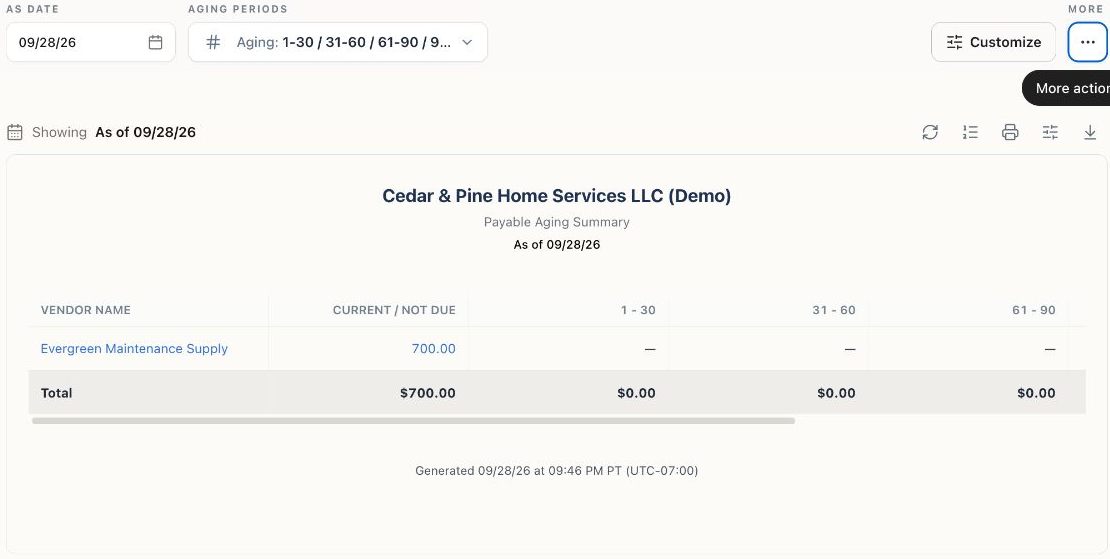
This view is filtered to one fictional Demo supplier. It is not the whole-company payable total; no bill or payment was changed.
Example: a partly paid bill
Section titled “Example: a partly paid bill”A $1,000 bill due October 15 has a $300 payment applied September 20. At September 30, its remaining $700 is Current / Not Due. At October 31, the same unpaid balance would be 16 days overdue. A payment dated November 1 must not reduce the October 31 snapshot.
Click a vendor name or linked amount to open Vendor Transactions. Check that report’s date range and payable view before comparing figures; the link does not necessarily preserve the aging cutoff.
Tie the report to the books
Section titled “Tie the report to the books”Compare with the accrual Balance Sheet’s Accounts Payable at the same date and scope. Posted vendor credits can reduce A/P even before they are applied to a particular bill. A supplier advance recorded as an asset is different: it should not be treated as a second expense or casually netted against unrelated bills.
Review any separate advance/excess-payment reconciliation information shown in your report. Use vendor balance differences when the vendor’s net relationship balance differs from A/P.
Before paying an overdue balance
Section titled “Before paying an overdue balance”Open the bill and check for payments, advances available to apply, credits, disputes, and duplicate documents. An old balance is not proof that another payment is needed. If a payment exists but is unapplied or has a later application date, review that allocation rather than entering a duplicate bank payment.