 Bokeping
Refund an unapplied customer payment
Return a deposit or overpayment and check the remaining credit without duplicating the refund.
In BokepingSales & Receivables → Payments Received
Use this guide for money still unapplied on a customer payment, such as an unused deposit or accidental overpayment. For a reduction of an invoiced sale, start with credits and refunds.
Check before refunding
Section titled “Check before refunding”Confirm the original receipt, customer, refundable unapplied amount, and any previous refund. If a payment provider has already refunded it or a dispute is open, check that status first. Recording the bookkeeping refund does not by itself prove the bank or provider sent money.
Record the refund
Section titled “Record the refund”- Open the payment in Sales & Receivables → Payments Received.
- Choose Refund when it is available. The action depends on refundable unapplied money and your permissions.
- Review Refund date, From account, and Amount against the actual repayment. Do not exceed the remaining refundable amount.
- Add Reference No. and Description so the refund can be matched to the bank or provider record.
- Choose Refund in the form to save the bookkeeping record.
- Check the remaining customer credit and the refund record. Keep evidence of the actual repayment separately.
The current shared refund form can be headed Refund Credit Memo even when opened from a payment’s Refund action. Start from the correct original payment and verify its available amount; the heading is not an instruction to create a new credit memo.
Recognize the refund form
Section titled “Recognize the refund form”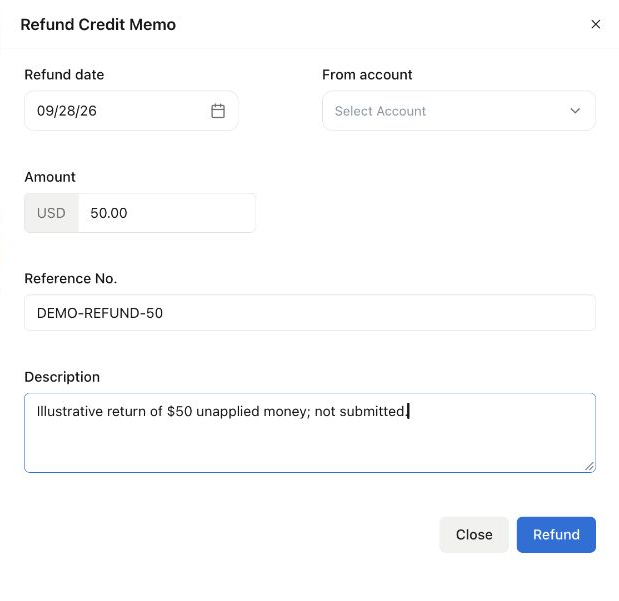
Opened from a Demo receipt with $350 unapplied. The amount was changed to $50 for illustration; From account is still unselected. The form was closed without saving or returning money.
For that example, a successfully recorded $50 refund would leave $300 unapplied, assuming no other applications or refunds. Always compare with the original receipt; do not assume the form’s starting amount is the amount you intend to return.
Example: return only the extra $50
Section titled “Example: return only the extra $50”A customer paid $550 for a $500 invoice. The invoice has $500 applied and is settled; the payment has $50 unapplied. Refund only the extra $50. Afterward, the invoice should remain settled and the refundable surplus should be $0.
If the full deposit has already been applied, it is not available as unapplied money. Review the invoice and its credit/application history rather than creating another receipt to force a refund.
If the action is missing
Section titled “If the action is missing”Check whether the surplus was already used or refunded, then check permissions and transaction restrictions. For a provider failure, retain the provider reference and contact support without including card numbers or credentials.