 Bokeping
Set up and review sales tax
Use tax rates on transactions and review your sales tax liability.
In BokepingSettings → Tax Settings → Tax Rates
Bokeping helps you record sales tax on supported transactions and review the liability. Recording sales tax does not register your business with a state or file a tax return.
Before you start
Section titled “Before you start”Confirm where you need to collect tax and which rates apply to your sales. Use your state or local tax authority’s guidance or your tax professional for those decisions. Sales tax features also depend on your company’s plan and permissions.
Set up and check tax
Section titled “Set up and check tax”- Open Settings → Tax Settings → Tax Rates and review existing rates before adding another one.
- Choose New tax rate. Enter a clear Name, a Code, and the correct Rate (%). Review Applies to so the rate is available for the intended sales or purchase documents. Review Compound Tax and Non-Recoverable Tax with your tax professional before enabling either.
- When entering a taxable transaction, select the applicable rate and inspect the calculated tax.
- Verify the customer’s details, taxable items, and document total before saving or sending.
- Open Reports → Sales Tax Liability Summary and select the relevant reporting period.
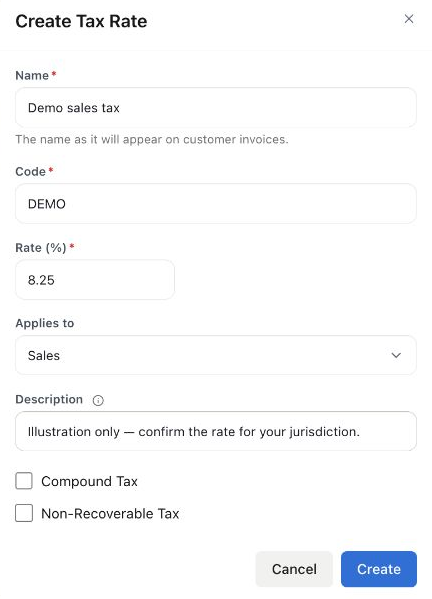
8.25% is an illustrative entry, not a recommended rate for any state or city. The form was not saved. Enter the rate that applies to the actual sale after confirming the relevant jurisdiction and taxability.
Check tax on an invoice
Section titled “Check tax on an invoice”Review the line’s tax rate and whether Amounts Are includes or excludes tax. A customer marked Exempt from sales tax can change the result even if you selected a tax rate on the line.
Tax is calculated on the line amount after its line discount. The whole-invoice discount and adjustment change the total, not the tax. Check the calculated tax before sending the document.
Review before filing
Section titled “Review before filing”Compare the report with your sales records and any adjustments for the period. Check that the reporting dates and tax treatment match the return you are preparing.
Do not assume a rate applies to every customer or every item. If a transaction’s tax is wrong, check its inputs before changing a rate that other documents use.
Related: Create an invoice and understand financial reports.
After paying the authority separately, record the sales tax payment against the liability.
To select rates from customer locations, see location-based tax rules. A rate and a location rule are separate settings.