 Bokeping
Check the date when applying an advance
Apply existing customer or vendor money without changing the original receipt or payment date.
A receipt or payment date records when money moved. An application date records when an existing advance or credit settles an invoice or bill. Keep those facts separate.
Use Apply credits on the destination invoice or bill. Do not edit the original cash transaction merely to make a later document appear paid.
Choose an application date
Section titled “Choose an application date”The Set Applied on Date switch controls whether each selected credit uses its own application date:
| Setting | Behavior |
|---|---|
| On | Credits applied date is editable for every source, including customer receipts and vendor payments. It initially defaults to today. |
| Off | Uses the dialog’s current-day default for all selected rows. |
Transaction date remains the original document/payment date. Changing an application date does not rewrite the original bank receipt or payment.
- Confirm the destination invoice or bill is posted, has a remaining balance, and belongs to the same contact as the advance.
- Open Apply credits and find the source by its number, transaction date, and available amount.
- Leave Set Applied on Date on and enter the intended Credits applied date. For a receipt on August 20 applied to an invoice dated September 10, select September 10 if that is the actual application date.
- Enter the allocation in Credits to apply. Review Amount to credit and Balance after apply.
- Choose Apply credits, then check the saved application/history and remaining balances. A validation error is not a completed application.
For ordinary past-dated documents, the application cannot precede either the source or destination date, cannot be later than today, and must belong to an open period. Future-dated documents use the date window enforced by the app. Do not change source dates to bypass these rules.
If applying today, either use today’s row dates or switch row dates off. Reopen a dialog left open across midnight so its default is current.
Closed months and reconciled payments
Section titled “Closed months and reconciled payments”The dedicated application workflow preserves the original payment rather than rewriting its bank movement. An old payment being in a closed period does not by itself mean you must reopen that period to apply available money today. The new application still needs a valid open date and an eligible source/document.
If the action is unavailable, check permissions, remaining balances, void/refund status, and the displayed restriction. Do not undo a completed bank reconciliation solely to try to allocate an advance.
Check both dates in reports
Section titled “Check both dates in reports”For an August advance used against a September document, the August cash movement should remain in August. Check the application in September and compare historical aging and account balances using the saved dates. A current zero balance does not prove an earlier month’s report should also show zero.
See the allocation fields
Section titled “See the allocation fields”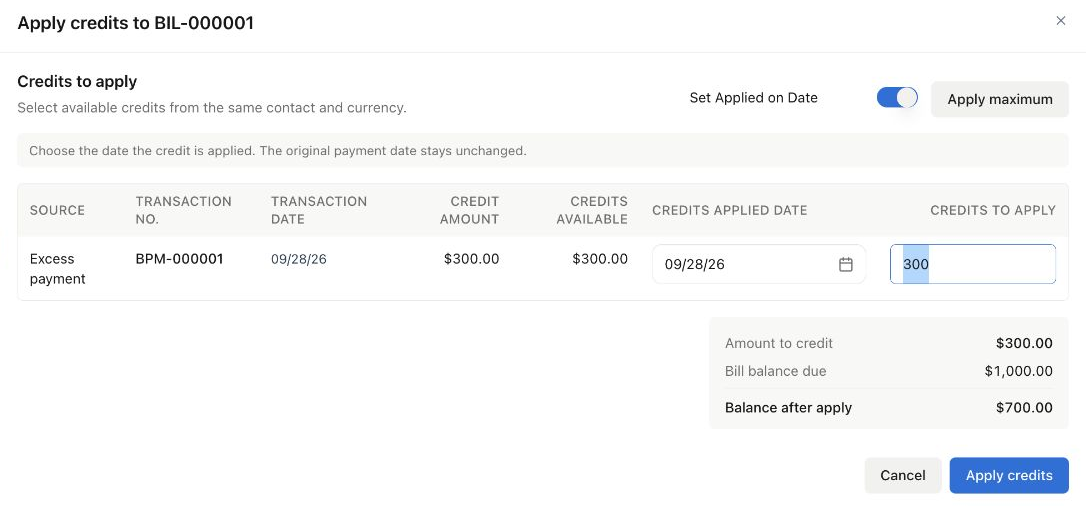
Same-day Demo example: $300 from an existing payment is applied to a $1,000 bill. This screenshot illustrates the allocation fields, not a verified cross-month or closed-period application.
For the complete entry and result checks, see apply a vendor advance. Use the date behavior described above for your source type.