 Bokeping
Add a vendor
Create the supplier record used by bills, expenses, and payments made.
In BokepingContacts → Vendors
Add one vendor record for each supplier you pay. Before creating it, search Contacts → Vendors for the business name so future bills and payments stay together.
Create the vendor
Section titled “Create the vendor”- Open Contacts → Vendors and choose New to open New Vendor.
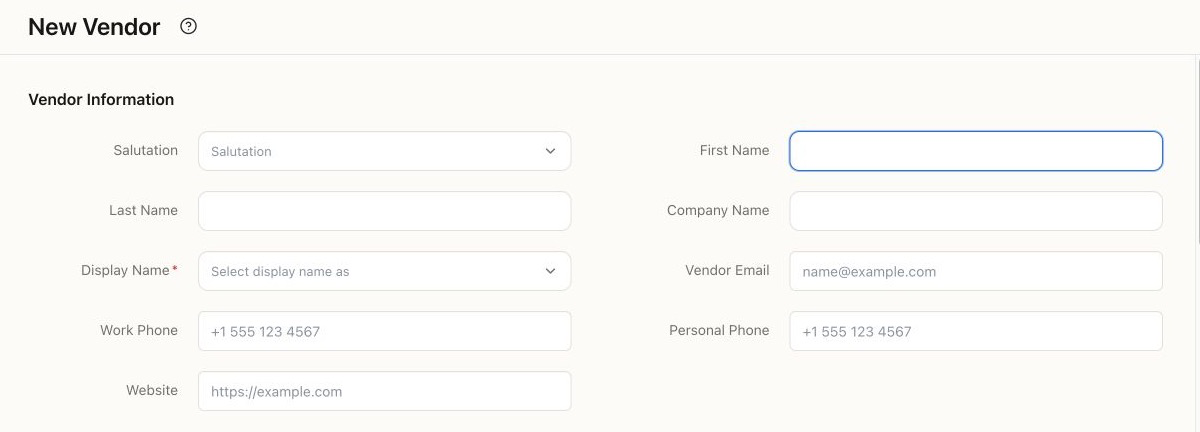
- Enter the person’s name or Company Name, then choose the required Display Name. This is the name you will select on purchases.
- Add Vendor Email, phone, website, and address details you need. Use Same as billing address only when the two addresses match.
- In Financial, review the company currency. It is locked on this form.
- If you are migrating an outstanding balance, review Opening Balance and Opening Balance At with your cutover plan. For a new supplier with nothing owed, do not invent an opening balance.
- Choose Save. Find the vendor in the list and verify the display name and contact details before recording a purchase.
If this is a contractor
Section titled “If this is a contractor”Track Payments for 1099 marks the vendor as a 1099 contractor. Review Tax Classification and Tax ID (EIN/SSN) against the information the contractor supplies, such as a W-9. Enabling the checkbox does not itself file a tax return or determine whether payments are reportable.
Avoid a duplicate starting balance
Section titled “Avoid a duplicate starting balance”If you enter the supplier’s unpaid bills individually, do not also add their total as a vendor opening balance. A $600 bill plus a $600 opening balance for the same debt would overstate what you owe by $600.
If Display Name is empty, fill the name fields first and select the intended display name. If you cannot create vendors, ask the owner to review your permissions.
For an existing supplier list, see import customers and vendors. For contractor reporting, see review the 1099 Contractor Report.