 Bokeping
Why does a vendor balance differ from the statement?
Check missing bills, payments, advances, and report dates before changing your payable balance.
In BokepingReports → A/P Aging Summary
A vendor statement and Bokeping may use different dates or include different documents. Start with the same vendor and statement cutoff; do not enter a balancing expense simply to make totals agree.
Compare the same period
Section titled “Compare the same period”Open Reports → A/P Aging Summary and review the report date. Compare it with the vendor’s statement date. Inspect the vendor’s bills, payments, and credits for the same period, including opening balances from a migration.
Trace the difference
Section titled “Trace the difference”| Difference | What to check |
|---|---|
| A bill is still outstanding after payment | The payment exists but may not be allocated to that bill. |
| The vendor owes you money | Look for an unapplied advance or credit before recording another payment. |
| Bokeping is higher by exactly one bill | Check for a duplicate bill or a duplicated vendor opening balance. |
| The vendor statement is higher | Look for a missing bill or a payment the vendor has not received/allocated yet. |
| Totals changed after an earlier close | Review backdated edits and the report date with your accountant. |
Example: $1,000 bill and $300 advance
Section titled “Example: $1,000 bill and $300 advance”Before allocation, the $1,000 bill can remain open while a separate $300 unapplied prepayment exists. After you allocate the original advance, the bill should have $700 remaining. Before allocation, A/P can remain $1,000 while $300 is held separately in the Vendor Prepayments asset account. After application, A/P is $700 and that advance is consumed. Compare the prepayment schedule separately rather than forcing the open-bill total to show a net figure before application.
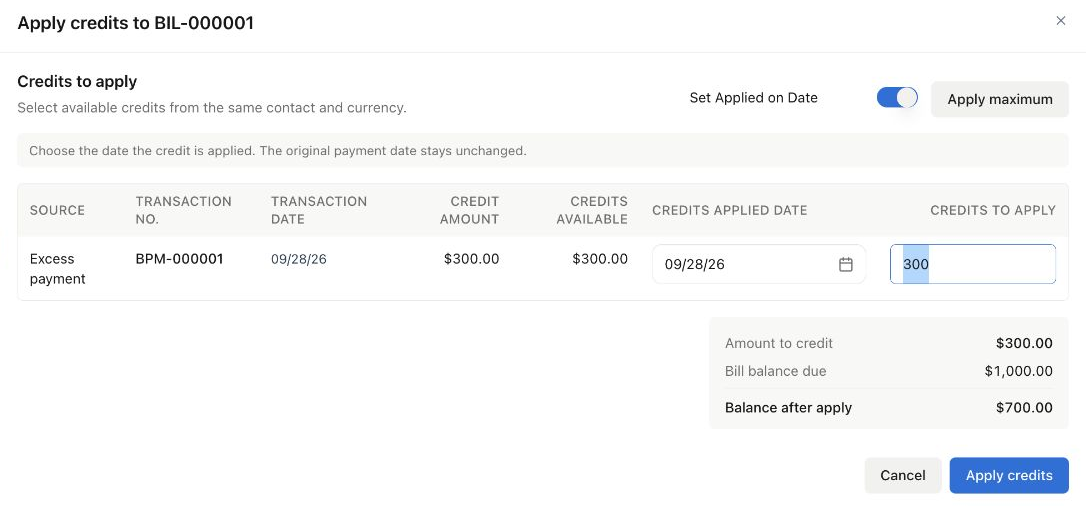
This is the Demo company’s $300 advance application to a $1,000 bill. The application was saved and the $700 remaining balance was verified in the bill.
Finish the check
Section titled “Finish the check”Re-run the report after correcting the verified source record. Keep the vendor’s statement and your list of differences. Compare the A/P control account with supporting vendor balances using consistent dates; journal-only changes may not explain individual vendor documents.