 Bokeping
Combine received payments into a bank deposit
Move selected Undeposited Funds receipts into one bank deposit without recording sales twice.
In BokepingBanking → Bank Deposits
Use Bank Deposits when multiple receipts already recorded in Undeposited Funds are deposited together at their full total. This moves recorded money into the bank; it does not record another sale.
Check the receipts first
Section titled “Check the receipts first”Confirm that each receipt exists once, is eligible for deposit, and belongs to the batch on your deposit slip. A receipt already recorded directly in the bank or in a processor clearing account is not an Undeposited Funds receipt for this form.
Create the deposit
Section titled “Create the deposit”- Open Banking → Bank Deposits and start a new deposit.
- Select the bank account in Deposit to and enter the actual Deposit date.
- Add Reference No. and Memo to identify the deposit slip or batch.
- In Payments to deposit, select the receipts that make up the batch.
- Compare Deposit total with the actual deposit. Choose Create deposit only when the amounts and selected receipts are correct.
- Review the saved deposit, then match the bank’s deposit row to this record when it arrives.
Example: two checks deposited together
Section titled “Example: two checks deposited together”Two customer receipts of $120 and $180 were already recorded to Undeposited Funds. Select both for a $300 deposit. Undeposited Funds should decrease by $300 and the bank should increase by $300; customer revenue and invoice settlement are not recorded again.
If the bank received less
Section titled “If the bank received less”The current form has no fee-deduction or arbitrary adjustment field. A $100 receipt with a $3 withheld processing fee is not a $100 bank deposit. Do not change the customer’s payment to $97 or create a false $100 deposit.
Use the net-payout reconciliation guide to separate gross receipts, fees, and net cash. Processor clearing accounts and this Undeposited Funds form are different workflows.
If no payments appear
Section titled “If no payments appear”The form displays No payments are waiting in Undeposited Funds when none are available. Check the receipt’s deposit account, company, and whether it has already been deposited or reversed. Do not record the receipt again just to make it appear.
Recognize an empty deposit form
Section titled “Recognize an empty deposit form”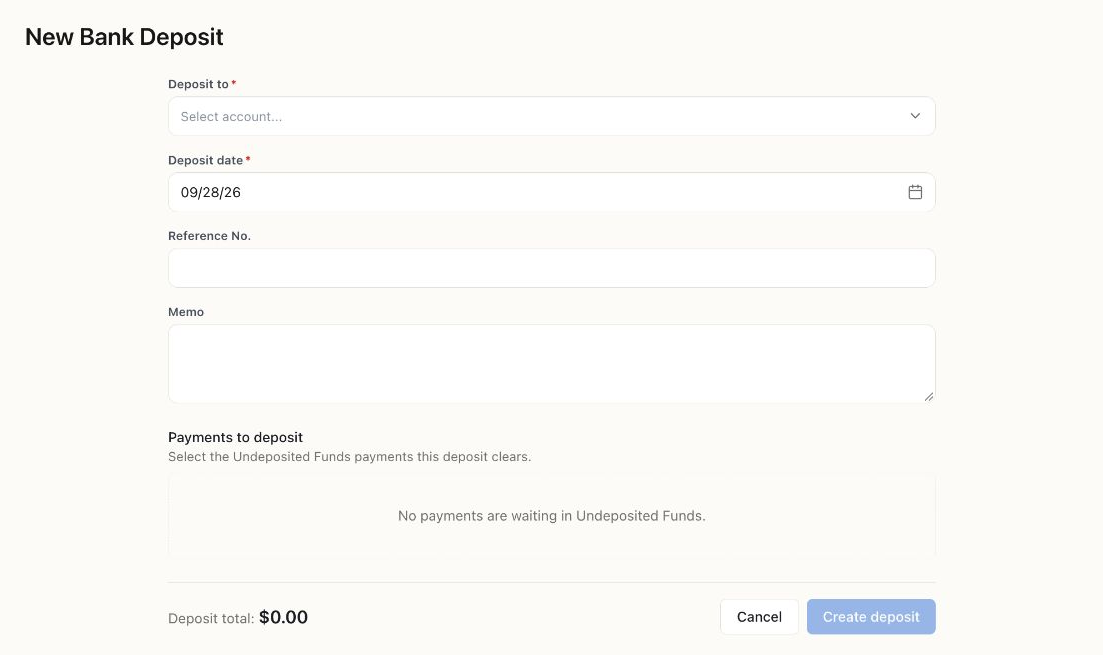
The Demo company has no eligible Undeposited Funds receipts. Create deposit is disabled at $0. This is an empty-state example, not a saved deposit.