 Bokeping
Accept online invoice payments
Connect a supported payment provider and understand what happens after a customer pays.
In BokepingSettings → Payment Methods
Bokeping supports invoice payments through Stripe and Forte. Your provider handles payment processing; its fees and merchant agreement are separate from your Bokeping subscription.
Before you start
Section titled “Before you start”You need a supported provider account and permission to manage the company’s payment settings. Complete the provider’s onboarding and review its fees before taking live payments.
Set up online collection
Section titled “Set up online collection”- Open Settings → Payment Methods in the company that will receive payments.
- Choose Set it Up beside Stripe or Forte and complete the setup shown for that provider. Each company can keep one provider connection at a time; see provider setup and switching if another is already connected.
- Confirm that the connection is active, uses the intended environment, and has Offer on invoices on. For Forte, review Card and Bank account (eCheck); eCheck also requires merchant approval from Forte.
- Open the invoice and review Payment Options before sending it. Setup payment gateways is the shortcut shown when setup is needed.
- Check the customer-facing invoice link to confirm that the intended payment option is available.
Fees still apply during a trial
Section titled “Fees still apply during a trial”A Pro software trial does not waive transaction-processing fees. Check your provider agreement for the rates that apply to your account and payment methods.
A payment is not the same as a payout
Section titled “A payment is not the same as a payout”A customer payment settles an invoice. A provider payout is the money later deposited into your bank account; it can combine payments and subtract fees or other adjustments.
Check payment status before marking an invoice paid manually. Reconcile the provider’s payment and payout records with Bokeping and your bank activity. Avoid recording both the customer payment and the payout as separate sales.
For a pending or failed payment, check the provider’s status and error details before asking the customer to try again.
For bank payments such as eCheck, an accepted payment and available funds are different stages. A payment may be recorded before the provider funds it, and a bank payment can later be returned. Verify the provider’s funding or return status and the corresponding records before treating it as money received in your bank. Do not enter a duplicate manual receipt just because the payout has not arrived.
If you temporarily stop collection, turn Offer on invoices off. This keeps the connection but prevents customers from paying through it, including pages they already opened. Follow pause or switch providers before deleting a connection.
Related: Create and send an invoice and review bank transactions.
If the bank deposit is lower than the customer payment, follow payout differences before recording another receipt or fee.
Recognize the provider setup
Section titled “Recognize the provider setup”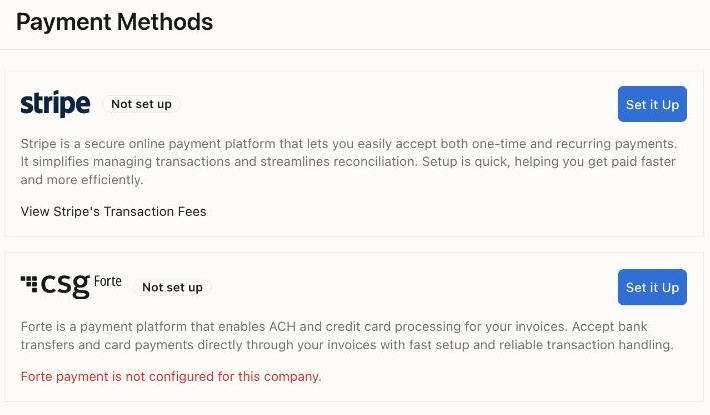
The Demo company is not connected to either provider. This image shows where setup starts, not an enabled checkout. Processing fees are separate from the software trial.
Follow provider setup for the connection and invoice controls.