Year-end records / Accountant handoff
Year-End Bookkeeping Checklist for Your Accountant
A useful year-end handoff gives your accountant the right reports, the supporting records and a clear list of open questions. Start by agreeing the company, reporting period and accounting basis. Then review the books, prepare the requested files and confirm what still needs a decision.
XLSX and CSV · No signup required · Manual checklist, file register and question log
Updated Sources checked
Your year-end bookkeeping checklist
The Excel workbook contains these 12 checks, with editable status, owner and evidence fields. Its Handoff files sheet includes a 10-item file register and 10 blank rows for unresolved questions. Enter the agreed company, reporting dates and basis once on the Checklist sheet. Use a different period for individual files where required.
Yellow cells are for your entries. The CSV contains the 12 checks only. Both downloads are manual working files: no formulas, automatic totals, account connection or tax filing. Marking an item complete records your review; it does not approve accounting adjustments or close the books.
01Agree the company, period and basis
Confirm the legal entity, reporting start and end dates, Cash or Accrual basis, and the accountant's requested files. A fiscal year can differ from a calendar year.
Where: Agree with your accountant; use the matching report controls in Bokeping.
Related walkthrough : Agree the company, period and basis02Gather statements and review missing activity
Collect every bank and card statement covering the period. Review missing transactions, duplicate imports and unclear transfers against the original records.
Where: Get statements from your banks; review the corresponding activity in Banking.
Related walkthrough : Gather statements and review missing activity03Reconcile each bank and card account
Use the statement's actual dates and balances. Investigate uncleared items, then finish and verify History. Saving progress is not a finished reconciliation.
Where: Banking → Reconcile, with the original statement alongside it.
Related walkthrough : Reconcile each bank and card account04Review customer balances
Inspect unpaid invoices, credit notes and unapplied payments. Explain old or disputed balances and timing differences; do not mark an invoice paid without a real payment.
Where: Reports → A/R Aging Summary, supported by customer and invoice records.
Related walkthrough : Review customer balances05Review vendor balances
Inspect unpaid bills, vendor credits and payments. Record missing bills and unexplained balances for review, and keep unpaid amounts distinct from amounts paid.
Where: Reports → A/P Aging Summary, supported by vendor and bill records.
Related walkthrough : Review vendor balances06Review inventory if applicable
Compare the physical count and valuation at the agreed cutoff. Document quantity and cost differences, warehouse scope and any adjustments still awaiting review.
Where: Reports → Inventory Valuation, plus your physical count records.
Related walkthrough : Review inventory if applicable07Collect asset, loan and owner records
Gather asset purchases and disposals, loan statements and owner contributions or withdrawals. Ask your accountant to review classification and any required adjustments.
Where: Original receipts, contracts and lender statements; trace entries in General Ledger.
Related walkthrough : Collect asset, loan and owner records08Collect payroll and tax documents
Obtain applicable payroll summaries, filed returns, payment confirmations and prior-year accountant adjustments. Confirm coverage with the provider or preparer.
Where: The actual payroll provider, tax preparer or filing service and your retained records.
09Review contractor payment records
Confirm payee information and trace payments by calendar year and payment method. Keep filing decisions and submission confirmations separate from the bookkeeping review.
Where: Vendor records and the USD-company 1099 Contractor Report; secure W-9 records.
Related walkthrough : Review contractor payment records10Prepare the requested financial reports
Refresh Profit and Loss, Balance Sheet and Trial Balance for the agreed scope. Add General Ledger or other reports the accountant requests; inspect each output before sharing.
Where: Reports; export or print each requested report using its available controls.
Related walkthrough : Prepare the requested financial reports11Create a file list and open-question log
List the files, periods, basis where applicable and secure locations. Give each unresolved item a reference, owner and next action; keep it open until reviewed.
Where: The workbook's Handoff files sheet and your secure document folder.
12Confirm receipt, access and closing decisions
Share through an agreed secure channel, confirm receipt and assign follow-ups. Use individual accountant access if needed. Agree any period lock after review with an authorized user.
Where: Settings → Team & Access → External accountants; Accounting → Period Close is a separate action.
Related walkthrough : Confirm receipt, access and closing decisions
What to send your accountant
Use this as a starting list and confirm the final scope with your accountant. Some files come from Bokeping; others must come from the bank, a provider or your own supporting records. Keep each entity's documents separate and label draft files clearly.
| File or record | Where to obtain it | Check before sharing |
|---|---|---|
| Profit and Loss | Bokeping report | Agreed start/end dates and Cash or Accrual basis; refresh before exporting. |
| Balance Sheet | Bokeping report | Agreed year-end date and basis; explain unusual asset, liability and equity balances. |
| Trial Balance and requested General Ledger | Bokeping reports | Use the requested period. Balanced debits and credits do not prove every entry is correct. |
| A/R and A/P aging | Bokeping reports | Agreed cutoff, with explanations for old balances, credits and payment differences. |
| Inventory valuation and physical count | Bokeping report + your count records | If applicable: agreed cutoff and warehouse scope, plus unresolved quantity or cost differences. |
| Bank, card and loan statements | Obtain from the financial institutions | Complete period coverage. Keep originals with the corresponding reconciliation or loan review. |
| Asset and owner transaction support | Your receipts, contracts and records | Acquisitions, disposals, financing and owner activity, linked to the relevant ledger references. |
| Payroll, filings and prior-year records | Your provider, preparer and retained records | Applicable summaries, filed returns, payment confirmations and prior-year adjustments. |
| Contractor payment review | Bokeping records + secure source documents | Calendar year, payee and payment method. A report export is not proof that a return was filed. |
| File list and unresolved questions | Your completed handoff workbook | File/version references, named owners and agreed follow-up actions. Confirm the accountant received it. |
For a calendar-year company, an example filename is ExampleCo_2026-01-01_2026-12-31_PL_accrual_v1. Adapt it to the actual company, dates, basis and version. A Balance Sheet uses an as-of date; a contractor payment review uses a calendar year even when the company's financial year is different.
Keep receipts, invoices and other source documents available to explain the entries. The IRS describes these supporting records in its recordkeeping guidance. A report alone may not supply all the evidence your accountant needs.
Prepare and review the files in Bokeping
1. Set the report period and basis, then refresh
Open Reports → Profit and Loss. Set the agreed start and end dates, select Cash or Accrual as requested, then refresh. Review unusual balances and follow account links to the underlying ledger entries. Open Balance Sheet and the other requested reports separately, checking each report's own date controls.
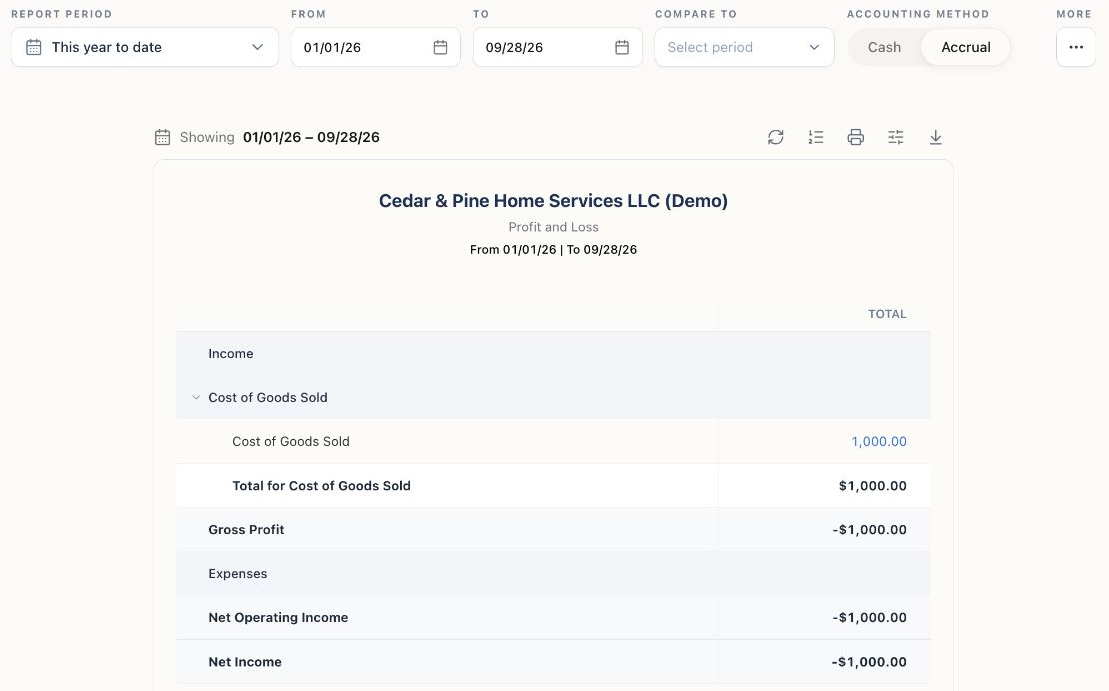
Use each report's available Export report or Print report action. Profit and Loss supports CSV and Excel exports; formats and permissions vary by report. Inspect the downloaded file's dates, labels and values before adding it to the handoff. These individual exports are not a complete company backup.
If your accountant requests the Statement of Cash Flows, it uses the indirect method and starts from accrual net income. It does not have the Profit and Loss report's Cash/Accrual toggle.
Financial statements walkthrough2. Reconcile against the actual bank statement
Open Banking → Reconcile, choose the account and enter the statement's actual dates and balances. Match the cleared transactions to the statement and investigate any difference. Matching an imported transaction to an entry is a different task from completing a statement reconciliation.
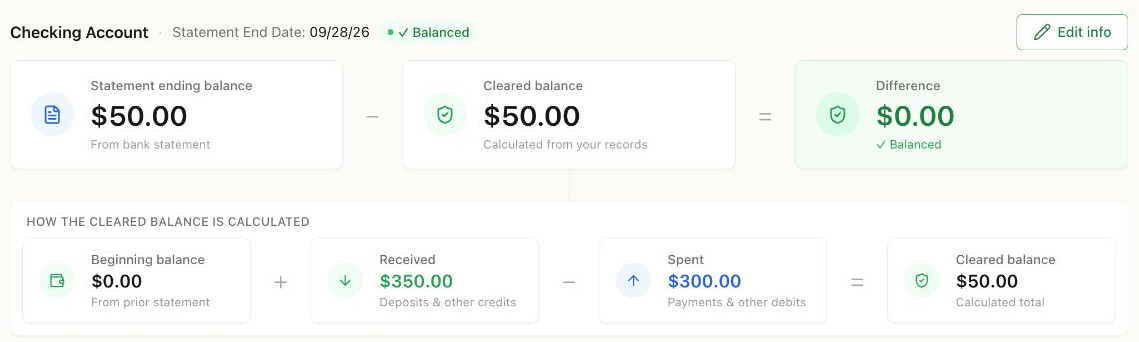
A zero difference is one check, not proof that the whole year's bookkeeping is complete. Review uncleared items, finish the reconciliation and verify it in History. Saving progress leaves the work in progress. Keep the bank's original statement and explain legitimate timing differences; do not add an arbitrary adjustment to force a match.
Bank reconciliation walkthrough3. Record the questions that the reports cannot answer
For an unidentified payment, a missing vendor bill or an unexplained inventory difference, add its date or reference, your question, an owner and the next action to the workbook. Leave it open until reviewed. Update the file register when you replace a draft report so the accountant can identify the version used.
Review the month-end review routine for the underlying checks. For U.S. contractor records, use the separate 1099-NEC payment checklist; a report download does not submit a return or deliver recipient copies.
FAQs
Year-end handoff questions
Agree the scope first. Common starting files are Profit and Loss, Balance Sheet, Trial Balance, requested ledger and aging reports, bank and card statements, and supporting asset, loan, payroll and tax records. Include unresolved questions and inventory records where applicable. Your accountant may request additional documents for your business.
Yes. Enter the agreed company reporting period and use the matching dates in each report. Some separate obligations use a different period: the 1099 contractor review uses a calendar year. Do not assume every document should use the same date range.
No. It is a manual checklist and file register with editable statuses and notes. It has no formulas, automatic totals, account connection or filing function. Prepare reports separately in Bokeping using the controls and permissions available for each report; the download is not a complete company backup.
No. It means the current cleared selection matches the entered statement balance. Verify the statement details and transactions, finish the reconciliation and check History. Review outstanding items and the rest of your records separately. A balanced Trial Balance also does not prove that every transaction is complete or correctly classified.
An authorized user can open Settings → Team & Access, select External accountants and use Invite external accountant. Choose the appropriate permissions and have the accountant use their own login; external accountant access requires two-factor authentication. Availability depends on the company's plan, capacity and permissions. Share supporting documents through your agreed secure channel.
No. Preparing files, an accountant reviewing them and locking a period are separate steps. Agree the closing date and resolve follow-ups first. An authorized user can then use Accounting → Period Close and review its checks before confirming. Completing a checklist does not close the books or confirm that a tax return was filed.
Sources and scope
Sources checked on . This is a bookkeeping preparation guide, with U.S. recordkeeping references. Agree your business's reporting and filing requirements with your accountant. The IRS references support the recordkeeping guidance; the linked help guides describe Bokeping's workflows.
- IRS: Recordkeeping
Why business records support financial statements, income and expense tracking, and tax-return preparation. This does not define Bokeping's product features.
- IRS: What kind of records should I keep?
Supporting documents for business activity, including receipts, invoices and asset records. The documents needed depend on the transaction and business.